
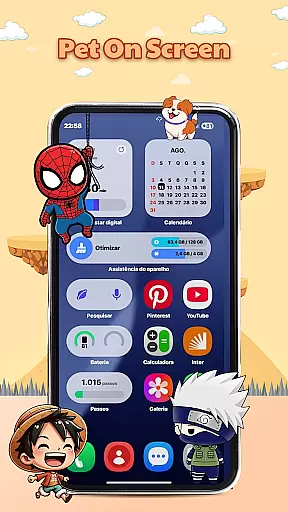
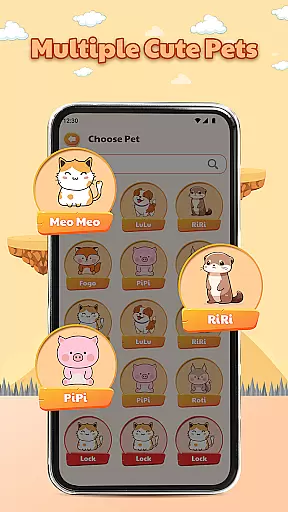
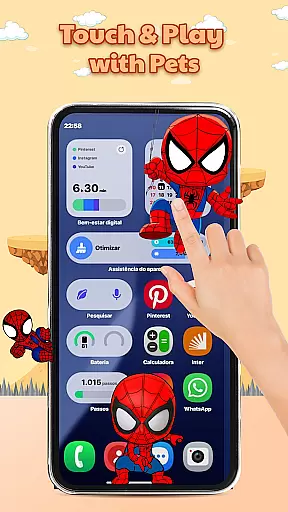
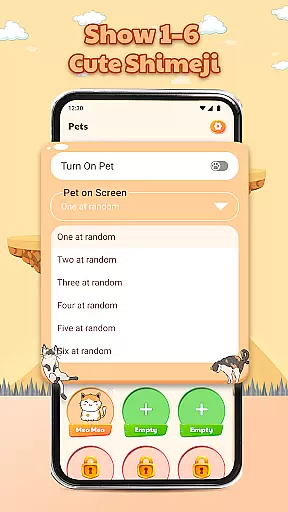
Pet On Screen - Shimeji Kawaii is a delightful personalization app that brings your phone to life with adorable animated characters. These cute, anime-style pets walk, climb, and play across your screen, creating an interactive and lively experience.
With a wide selection of charming characters to choose from, including chibi and cartoon styles, this app lets you customize your device's appearance while enjoying playful interactions. Whether you're looking for a fun companion or a stress-relief tool, these virtual pets provide both entertainment and personality to your everyday digital experience.
The app offers a variety of engaging features designed to enhance user enjoyment. One standout feature is the live mini characters that move naturally on your screen, mimicking real-life behaviors such as climbing edges or falling down.
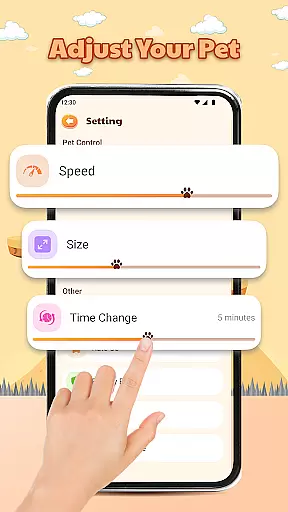
Another key aspect is its advanced customization options. Users can easily adjust character size, movement speed, and other settings to match their preferences. The playful interactions allow users to tap and hold characters to trigger unique reactions, making every interaction feel special and personalized.
These features combine to create a relaxing atmosphere every time you use your device, turning routine phone usage into moments of joy and stress relief.
Customization is at the heart of Pet On Screen - Shimeji Kawaii, allowing users to tailor their experience with a range of adjustable settings. This app provides an extensive selection of cute characters that can be modified in various ways to match personal preferences.
Users can choose from different styles such as anime, cartoon, and chibi, ensuring that there's a virtual pet for every taste. The ability to adjust character size and movement speed offers a personalized touch, making each user's screen truly unique.
The app also lets you set the time and conditions under which your chosen pets appear, giving you control over when and how you interact with them. These customization options ensure that your device reflects your personality and style.
By offering such a wide array of choices, Pet On Screen - Shimeji Kawaii enhances user engagement and satisfaction. It makes every interaction with your device a delightful and personalized experience, setting it apart from other personalization apps.
Pet On Screen - Shimeji Kawaii excels in theme compatibility, seamlessly integrating with various device themes to enhance visual appeal. Whether you have a light or dark mode preference, these adorable characters adapt to maintain aesthetic harmony.
The app supports multiple screen formats and resolutions, ensuring that the pets look crisp and clear on any device. This adaptability extends to different operating systems, providing consistent performance across platforms.
Moreover, the app is designed to work smoothly alongside other customization tools you might have installed. This means you can enjoy your virtual pets without worrying about conflicts or reduced functionality.
With its robust compatibility features, Pet On Screen - Shimeji Kawaii guarantees a cohesive and visually pleasing experience. Users can enjoy their personalized screens knowing that the app will consistently deliver charming and well-integrated animations.
Cute animated characters
Easy to customize
Fun interactions
Stress-relief tool
Wide pet selection
May drain battery
Limited free options
Can be distracting
Not for everyone
Occasional bugs

Beautiful realistic hybrid watch face with numerous customization options.
 4.50
4.50
Shimeji adds cute animated characters to your screen, lively and fun.
4.70
Over 28,000 high quality icons to bring color & homogeneity to your phone.
4.60
Romantic Kiss Stickers App. Start romantic messaging now!
4.30 4.50
4.50
Unleash Your Creativity and Connect with Loved Ones with Lockscreen Drawing!
4.20
300+ widgets inspired by Material You and Material 3 expressive design.
4.60
Emoji Maker app - Design custom emojis and effortlessly blend them with Mixer
3.80
Cool custom fonts & keyboard themes! Symbols & font changer for Instagram
4.50
Nothing Icon pack with more than 3750+ highly crafted icons.
4.70
A launcher for Samsung Good Lock and Good Guardians modules without ads
4.70
350+ widgets with a premium glass-style finish, perfect for home & lock screens.
4.70
Make your phone look simple & luxury, like iDevice
4.60
Want to make your phone more special than ever?
4.60
3D, live, and moving wallpapers & themes in 4K and HD for your device.
4.50 4.50
4.50
Color phone with cool effects for call screen, flash alert & ringtones music
4.50
Art & Emoji Keyboard with Cool Fonts, Cute Themes and Custom Designs.
4.40
HappyLighting is a Bluetooth lamp control software.
3.40


User Reviews