
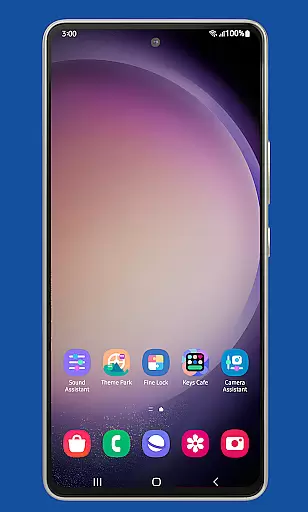
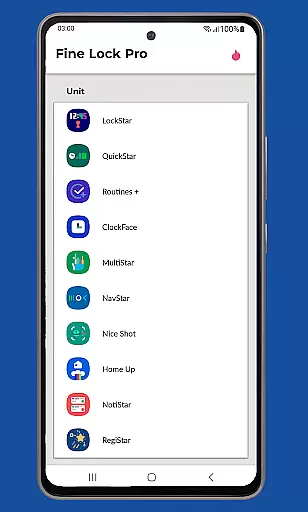
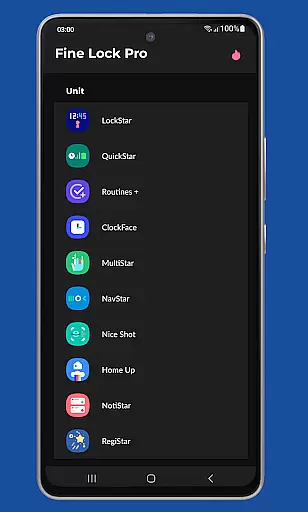
Fine Lock is a specialized launcher designed exclusively for Samsung devices running official One UI, enabling users to access and utilize Good Lock and Galaxy Labs modules. This app bridges the gap for users in regions where these customization tools are not readily available through Galaxy Store.
With Fine Lock, users can enjoy advanced customization options and optimization features that enhance their Android experience on Samsung devices. The app supports key functionalities like module shortcuts, background update checks, and dynamic wallpapers that adapt to Dark/Night modes. It's an essential tool for power users seeking greater control over their device's interface and performance.
Fine Lock offers a range of powerful features tailored for Samsung device owners. The app acts as a gateway to Good Lock and Galaxy Labs modules, which are otherwise inaccessible in certain markets. Users can place module shortcuts directly on their home screen for quick access.
The PRO version includes additional capabilities such as background update notifications, the option to hide uninstalled modules, and dynamic wallpapers that respond to the device's theme settings. These features collectively provide a more personalized and optimized user experience, making it easier to manage and enhance your Samsung device's functionality.
Fine Lock offers a diverse range of customization options tailored specifically for Samsung devices running official One UI. This app acts as a launcher for Good Lock and Galaxy Labs modules, which are powerful tools for personalizing the Android experience on Samsung smartphones.
With Fine Lock, users can access features such as module app shortcuts directly from the home screen, providing quick entry points to their favorite customization settings. The ability to hide uninstalled modules ensures a clutter-free interface, enhancing user experience by displaying only relevant options.
The app also supports dynamic wallpapers that adapt to the device's Dark or Night modes, provided the device runs on Android 9 or later and has scheduled Dark/Night mode enabled. This feature adds an extra layer of personalization, allowing users to enjoy visually pleasing backgrounds that change based on system settings.
Theme compatibility is a crucial aspect of Fine Lock, ensuring that all visual customizations align seamlessly with the overall design language of One UI. By integrating smoothly with Samsungu2019s ecosystem, Fine Lock guarantees that themes applied through its interface maintain consistency across different parts of the operating system.
Users benefit from this compatibility as it prevents disjointed aesthetics when switching between various apps and system menus. Whether applying a new theme or tweaking existing ones, Fine Lock ensures that every elementu2014from icons to color schemesu2014harmonizes perfectly within the One UI environment.
Moreover, Fine Lock's adherence to Google Play policies means users must obtain APK modules from trusted sources like APKMirror or Sammobile. Despite this requirement, the app maintains robust compatibility standards, ensuring downloaded modules integrate flawlessly without causing crashes or inconsistencies in the user interface.
User-friendly interface
Enhanced customization
Regular updates
Dynamic wallpapers
Background checks
Samsung-only support
Limited market availability
No module downloads
Paid PRO features
Potential crashes

Customizable Glass widgets. Over 360+ stunning widgets and more!
 4.70
4.70
A light in the dark, a unique style and an andless cutomization!
4.30
Capture moments that pass like a storm, second by second.
4.1
Themes - Widget & Wallpaper: Customize home screen, icon changer w unique themes
4.30
Try creating your own keyboard with "Keyboard theme for android" app now!
4.50 4.50
4.50
Adaptive Dot Style IconPack with Light & Dark Theme.
3.70
Enjoy a variety of amazing live wallpapers and colorful EDGE lighting borders!
4.80
Cool custom fonts & keyboard themes! Symbols & font changer for Instagram
4.50
Only for Wear OS devices!
4.90
Classic analogue watch face. For wear os devices.
4.60
Add cute Shimeji pets to screen, interact with them and relax with cute motions
4.60
Choose your keyboard with RGB colors effect, themes, fonts, emojis.
4.60
Transform your device in a game console
4.40
Customizable flower power digital watch face for Wear OS watches.
4.00
Design your screen with unique, vibrant clocks
3.80
Transform your phone with stunning video wallpapers and a unique, personal touch
3.80
⭐ OneUI inspired Fluffy Icon Pack – Soft. Stylish. Standout. ⭐
4.1
Modern Glass Icon Pack with glossy icons, clean minimal theme & aesthetic style
4.1


User Reviews