
Find My App is a powerful personalization tool designed to help users efficiently manage and locate their installed applications. The app employs advanced technology to instantly identify all apps on your device, both existing and newly installed ones.
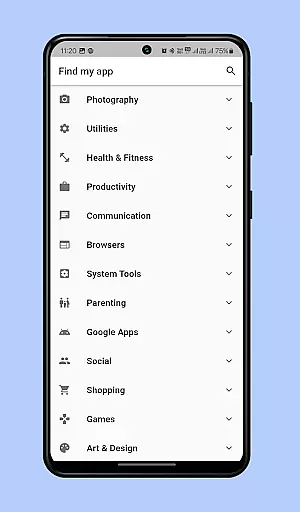
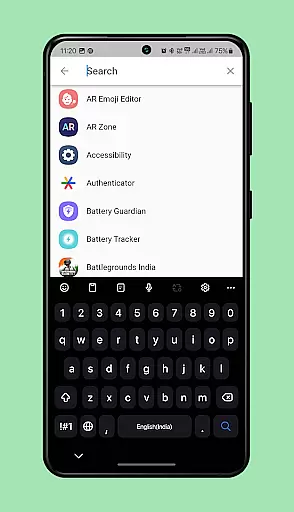
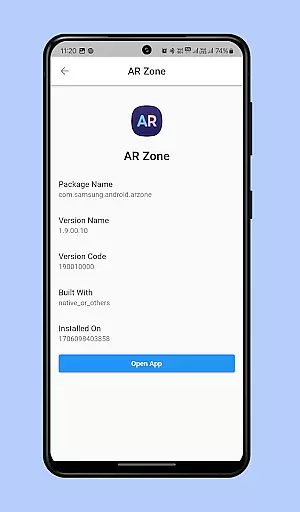
One of its standout features is the smart organization system that categorizes apps into an intuitive menu. This allows users to quickly find specific apps without endless scrolling. Additionally, the app includes a robust search function where you can type part or all of an app's name to instantly locate and open it.
This functionality is particularly useful for users who struggle with cluttered home screens or simply want faster access to their apps. By streamlining app management, Find My App significantly enhances user experience and saves valuable time.
Find My App offers several innovative features that set it apart in the personalization category. First, its real-time app detection capability ensures that every installed application is immediately recognized and categorized.
The app's intelligent categorization system groups similar apps together, making navigation more efficient. Users can browse through well-organized categories instead of searching through multiple pages of icons. Furthermore, the advanced search function supports partial matches and instant retrieval, allowing users to find apps even if they only remember part of the name.
Another notable feature is its lightweight design, ensuring minimal impact on device performance while delivering maximum utility. These features collectively create a seamless and enhanced user experience, making app management both intuitive and efficient.
Customization options variety refers to the range of features that allow users to tailor their app experience according to their preferences. In the case of Find my app, this is evident through its ability to organize installed apps into categorized menus.
The application intelligently identifies both existing and newly installed apps on your phone, arranging them in an efficient menu system grouped by categories. This categorization not only simplifies navigation but also enhances the user's capacity to manage a large number of applications effortlessly.
By providing various sorting and grouping options, Find my app ensures that users can customize their app layout in a way that best suits their usage patterns. This level of personalization empowers users to optimize their smartphone experience, making frequently used apps more accessible while reducing clutter.
Ultimately, the customization options provided by Find my app lead to a more organized and user-friendly interface, significantly cutting down the time spent searching for specific applications among numerous pages of icons.
Theme compatibility involves how well an application supports different visual themes, ensuring a consistent look and feel across various devices and settings. For Find my app, theme compatibility plays a crucial role in delivering a seamless user experience regardless of the deviceu2019s current aesthetic setting.
Find my app integrates smoothly with your phoneu2019s existing themes, maintaining visual coherence without disrupting the overall design language of your device. Whether you prefer light or dark modes, the app adapts accordingly, offering a visually pleasing interface that aligns with your chosen theme.
This adaptability extends beyond mere aesthetics; it includes functional aspects such as readability and ease of use within different thematic environments. By supporting diverse themes, Find my app ensures that all interactive elements remain clear and accessible, enhancing usability.
In summary, robust theme compatibility enriches the overall user experience by allowing Find my app to blend seamlessly into any visual environment, thus providing both aesthetic satisfaction and practical benefits.
Instant app detection
Intuitive category sorting
Advanced search functionality
Lightweight performance
Time-saving navigation
Limited customization options
Requires regular updates
Premium features locked
Occasional compatibility issues
Basic visual design

Ultimate widget creator. Design custom widgets for a truly unique home screen!
 3.90
3.90
Customize glowing edges, wallpapers, and caller screen with EdgeAura.
3.50 4.50
4.50
Organize and manage your photos and videos effortlessly with Photo Gallery
4.20
Choose your keyboard with RGB colors effect, themes, fonts, emojis.
4.60
Your home screen, just the way you like it.
4.30
Transform your phone with stunning video wallpapers and a unique, personal touch
3.80
Emoji Maker app - Design custom emojis and effortlessly blend them with Mixer
3.80
Transform your phone with stylish zipper lock themes and 4D live wallpaper
4.10
Winter's Journey: digital watch face for Galaxy Watch & Wear OS
4.80
Personalize your phone with stunning HD and 4K wallpapers!
4.70
Shimeji adds cute animated characters to your screen, lively and fun.
4.70
Nothing Icon pack with more than 3750+ highly crafted icons.
4.70
Bring adorable pets to life on your screen. Playful, interactive and full of fun
4.60
Transform your phone with Launcher iOS 26 - Smooth & elegant iOS experience
4.50
Aesthetic Widgets, HD Wallpapers, Themes in Mico Widget for Home and Lock Screen
4.50
Launcher OS™ Pro without ads help make your phone simple and pretty
4.30
Unique Fonts, typefaces and stylish text. Fonts for Instagram, Whatsapp & others
4.20
Magic fluids wallpaper 4D: Relax with stunning fluid simulation wallpaper app
4.20


User Reviews