
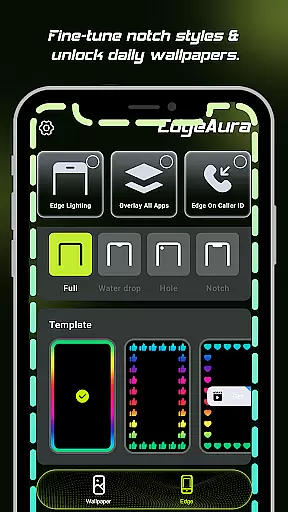
EdgeAura is a personalization app that enhances your device's visual appeal with stunning edge glow effects and dynamic live wallpapers. The app allows users to customize their phone screens with a vibrant aura of light that elegantly outlines the edges, making each device visually unique.
The app's core functionality includes a dynamic edge glow feature that lets you adjust color, width, and intensity to match your style. Additionally, it offers an extensive collection of high-quality animated live wallpapers, ensuring your home screen remains fresh and personalized. EdgeAura also integrates practical features like incoming call alerts through glowing screen edges, blending aesthetics with utility seamlessly.
Whether you want to make your phone stand out or enjoy an immersive visual experience, EdgeAura caters to those seeking both beauty and functionality in their mobile devices. Its floating overlay effect ensures the glow works across all apps without disrupting normal usage, providing continuous customization opportunities.
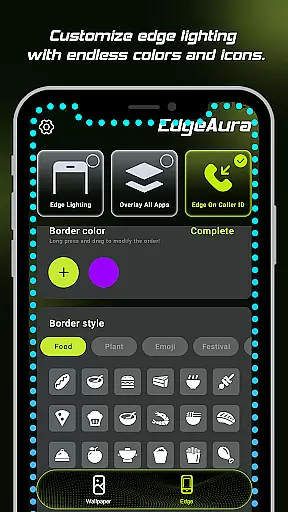
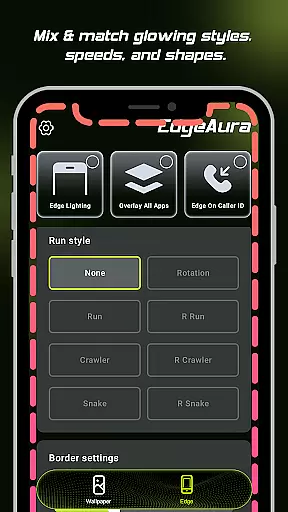
EdgeAura stands out with its innovative Dynamic Edge Glow feature, allowing users to frame their screens with a smooth, colorful glow. This highly customizable option lets you modify the color, width, and intensity of the light, ensuring it perfectly complements your wallpaper and personal style.
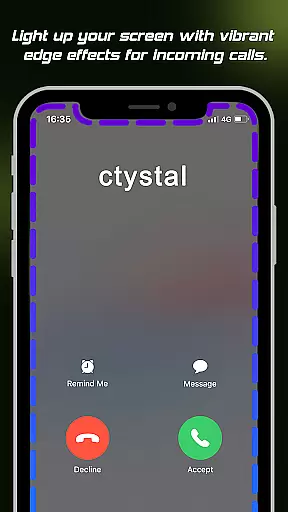
In addition to the glowing edge effect, EdgeAura provides a Floating Overlay Effect that operates seamlessly over other applications. This ensures an uninterrupted and immersive experience while using your phone for everyday tasks. The Incoming Call Alert feature adds another layer of personalization by lighting up the screen edges during calls, offering a modern notification method that is as functional as it is stylish.
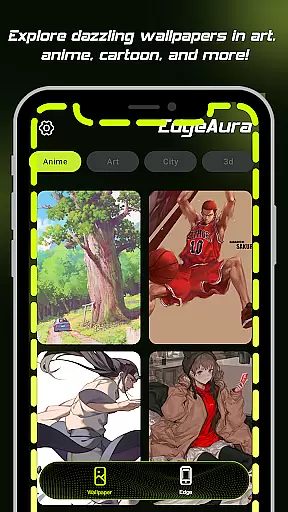
For those who love variety, EdgeAura boasts an Extensive Live Wallpaper Collection. Regularly updated with high-quality animated wallpapers, this feature keeps your home and lock screens lively and engaging. With these capabilities combined, EdgeAura delivers a comprehensive package for users looking to personalize and enhance their device’s aesthetics significantly.
EdgeAura offers a diverse range of customization options that allow users to personalize their device's visual experience. The app provides dynamic edge glow effects which can be tailored in terms of color, width, and intensity, ensuring that each user can find the perfect match for their style and wallpaper.
The ability to customize is crucial in personalization apps, as it allows users to express their individuality. With EdgeAura, you can adjust the settings to create an aura of light that elegantly outlines your screen's edges, making your phone not just a tool, but a reflection of your personal taste.
Moreover, the floating overlay effect works seamlessly over other applications, providing a continuous visual experience without disrupting normal phone use. This means that no matter what you're doing on your phone, the personalized glow effect remains a constant, beautiful feature.
In addition to the edge glow, EdgeAura also includes an extensive live wallpaper collection. Users can explore and apply high-quality, animated live wallpapers from a regularly updated library, instantly refreshing their home and lock screens. This adds another layer of personal touch to the device, enhancing its uniqueness and appeal.
Theme compatibility is a vital aspect of any personalization app, ensuring that visual enhancements like EdgeAura's edge glow effects work harmoniously with the user's chosen themes. EdgeAura excels in this area by providing a floating overlay effect that integrates smoothly with various themes and apps.
This compatibility ensures that the elegant glow effect does not interfere with the normal use of the phone, maintaining the integrity of the user interface while adding a vibrant and modern aesthetic. Whether you're browsing photos or reading text, the glow adapts to provide a visually pleasing experience.
Furthermore, EdgeAura's incoming call alert feature lights up the screen edges with the user's chosen color, offering a striking notification that blends well with any theme. This feature turns functional alerts into an opportunity for personal expression, all while remaining compatible with different visual styles.
By focusing on seamless integration and respecting the original design language of different themes, EdgeAura guarantees that its enhancements enrich the user's experience without clashing with their preferred aesthetics, thus preserving the overall harmony of the device's look and feel.
Highly customizable glow effects
Vibrant live wallpapers library
Unique incoming call alerts
Continuous visual overlay
User-friendly interface
Requires accessibility permission
May drain battery faster
Limited to Android devices
Premium features may cost extra
Some users may find settings complex

Make your phone look simple & luxury, like iDevice
 4.60
4.60
Unique Android Launcher
4.60
Customizable screen pets that play, climb, and keep you company.
4.50
100+ Stylish Fonts, Emojis, Symbols keyboard for Instagram & TikTok!
4.80
Unique Fonts, typefaces and stylish text. Fonts for Instagram, Whatsapp & others
4.20 4.50
4.50
Your go to Weather App & Home Screen. Get your weather at a swipe of a finger!
3.80
Transform your phone with stylish zipper lock themes and 4D live wallpaper
4.10
Cool custom fonts & keyboard themes! Symbols & font changer for Instagram
4.50
Gun Chase - Let the chase begin.
4.80
A launcher for Samsung Good Lock and Good Guardians modules without ads
4.70
400+ Beautifully crafted widgets inspired by NOTHING.
4.70
Over 28,000 high quality icons to bring color & homogeneity to your phone.
4.60
Vibrant Adaptive Icons with Material You and Enhanced Monet Colors.
4.50
Transform your device in a game console
4.40
A light in the dark, a unique style and an andless cutomization!
4.30
App Icon Changer & Shortcut Creator. Customize your icons without any watermarks
4.30
More than 3000+ themes and 9000+ wallpapers for everybody!
4.10
Ultimate widget creator. Design custom widgets for a truly unique home screen!
3.90


User Reviews