
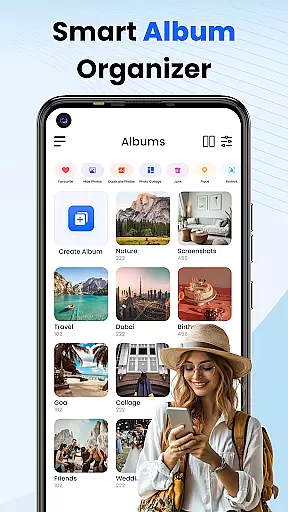
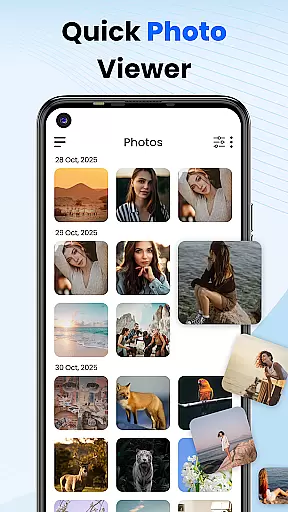
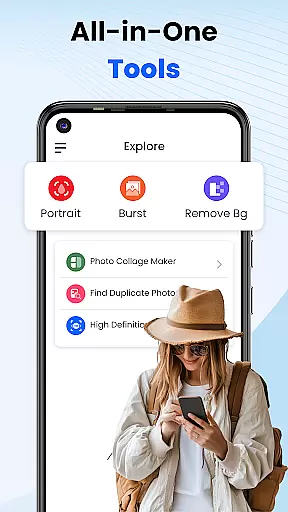
Gallery 2025 is a feature-rich photo management app designed to streamline the organization and enhancement of your photos and videos. With its smart organization tools, users can automatically categorize media by timeline, location, and path, making it easy to manage large collections. The app also supports transferring files to and from SD cards, ensuring seamless accessibility.
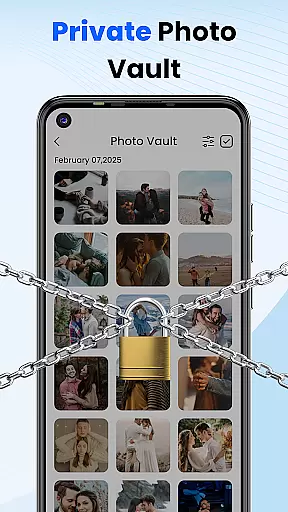
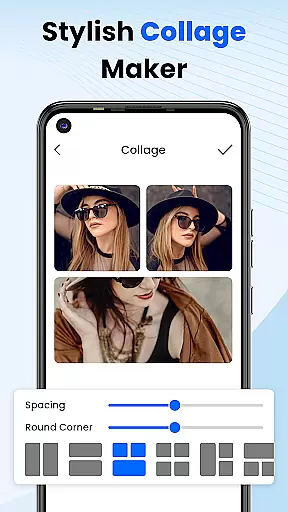
In addition to organizational features, Gallery 2025 offers robust privacy protections. Users can safeguard sensitive media in a secure vault, protected by a PIN, pattern, or security question. This ensures that personal memories and confidential images remain private. Its lightweight design and full suite of functionalities, including editing tools and collage creation, make it an essential app for anyone looking to enhance and protect their digital media library.
Gallery 2025 stands out with its comprehensive set of features tailored for efficient media management. One of its key strengths is the Smart Organization tool, which automatically sorts photos and videos by various criteria such as timeline, location, and file path. This makes it effortless to locate specific files and maintain an organized gallery.
The app also includes a powerful recovery option, allowing users to restore accidentally deleted media from the recycle bin. For those concerned about privacy, Gallery 2025 provides a Private Vault feature, where confidential media can be stored and protected by a numeric PIN, pattern, or security question. Additionally, the built-in photo editor and collage creation tools enable users to enhance and personalize their images directly within the app, offering both functionality and creativity in one package.
Customization is at the heart of Photo Gallery, allowing users to tailor their photo management experience according to their preferences. This app offers a wide array of customization options that cater to both novice and advanced users.
One of the standout features is the ability to automatically categorize photos and videos by timeline, location, and path, making organization effortless. Users can also create collages, edit photos with built-in tools, and manage albums with ease.
The app provides recovery options for accidentally deleted media, ensuring peace of mind. Additionally, privacy-focused customization such as PIN-protected vaults and gallery locks are available, giving users control over who can access their private content.
With these comprehensive customization options, Photo Gallery ensures that every user can have a personalized and secure photo management experience tailored to their unique needs.
Theme compatibility in Photo Gallery ensures that users can enjoy a visually cohesive experience across different devices and screen sizes. The app supports various themes, allowing users to choose one that best fits their aesthetic preferences.
Whether you prefer a light theme for daytime use or a dark theme to reduce eye strain at night, Photo Gallery has you covered. The app's interface adapts seamlessly to each selected theme, maintaining usability and visual appeal.
In addition to aesthetic themes, the app also ensures compatibility with functional themes that enhance accessibility. This includes high-contrast modes and scalable text sizes, which make the app usable for individuals with different visual needs.
By prioritizing theme compatibility, Photo Gallery not only enhances user satisfaction but also ensures that the app remains accessible and visually pleasing across diverse user environments.
User-friendly interface
Comprehensive privacy protection
Efficient media organization
Built-in editing tools
Lightweight and fast performance
Limited advanced editing features
Occasional bugs in older devices
Ads in free version
Requires account registration
Some features locked behind premium

A light in the dark, a unique style and an andless cutomization!
 4.30
4.30
Run multiple accounts of the same app on a single device
4.10
100+ Stylish Fonts, Emojis, Symbols keyboard for Instagram & TikTok!
4.80
Romantic Kiss Stickers App. Start romantic messaging now!
4.30
App Icon Changer & Shortcut Creator. Customize your icons without any watermarks
4.30
Zip lock screen with magic wallpaper to decorate your phone with fun zipper lock
4.60
Vibrant Adaptive Icons with Material You and Enhanced Monet Colors.
4.50
Transform your device in a game console
4.40
Cool custom fonts & keyboard themes! Symbols & font changer for Instagram
4.50
Bring adorable pets to life on your screen. Playful, interactive and full of fun
4.60 4.50
4.50
200+ Material Inspired Widgets
4.50
The definitive Icon pack maker and editor
4.30
Adult video chat, dating, making friends, random matching
4.20
Unleash Your Creativity and Connect with Loved Ones with Lockscreen Drawing!
4.20
Customizable flower power digital watch face for Wear OS watches.
4.00
Create unique, fun emojis with Funny Emoji Maker! Unlimited creativity!
4.00
Adaptive Dot Style IconPack with Light & Dark Theme.
3.70
Turn your lock screen into fun with smile live wallpapers & animated wallpapers!
2.50


User Reviews