
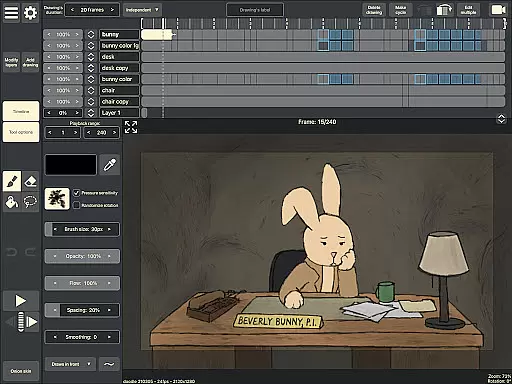
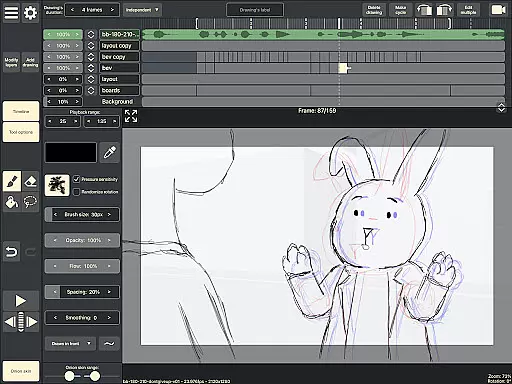
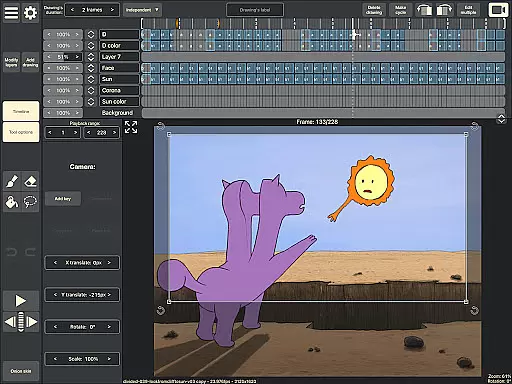
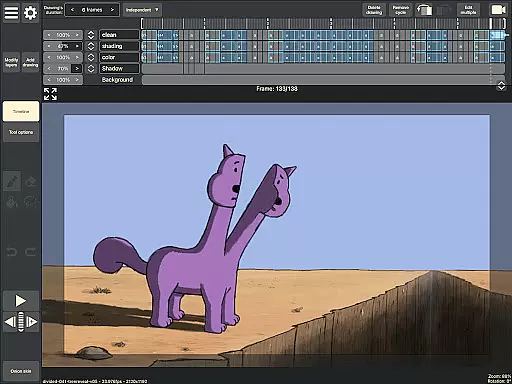
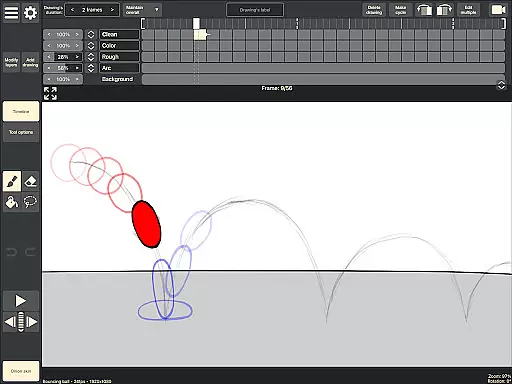
RoughAnimator is a professional-grade hand-drawn animation app designed for both Android tablets and smartphones. This powerful tool provides animators with everything needed to create traditional frame-by-frame animations on the go. With its robust feature set, it caters to professional animators while remaining accessible to beginners.
The application offers an intuitive timeline interface with unlimited layers, customizable exposure settings, onion skinning, and playback preview capabilities. Users can import audio for lip-syncing, video for rotoscoping, and export their work in various formats including Quicktime video, GIFs, or image sequences. The app also supports pressure-sensitive devices like Samsung S-Pen, making it versatile for different drawing styles.
RoughAnimator stands out with its comprehensive set of animation tools. The app's timeline allows users to work with unlimited layers and easily adjust the exposure length of individual drawings, supporting both pose-to-pose and straight-ahead animation techniques. Its onion skinning feature enables precise frame referencing.
Creators can preview their animations through playback functionality and scrub along the timeline for detailed adjustments. The app supports importing audio tracks for lip-syncing purposes and video files for rotoscoping. With custom brush options and compatibility with pressure-sensitive devices, RoughAnimator delivers a complete animation studio experience on mobile platforms.
Users can control frame rates and resolution settings, ensuring their animations meet specific quality requirements. Projects created in RoughAnimator can be seamlessly imported into industry-standard software like Adobe Flash/Animate, After Effects, and Toon Boom Harmony, providing flexibility for further refinement and production.
Creative tools are the backbone of any art and design application, and RoughAnimator excels in this area. As a fully featured hand-drawn animation app for Android, it offers animators a comprehensive suite of tools that cater to both professionals and beginners. The app provides a timeline with unlimited layers, allowing users to create complex animations with ease.
Onion skinning is another critical feature included, which helps animators see multiple frames at once, ensuring smooth transitions between poses. With support for custom brushes and compatibility with Samsung S-Pen and other pressure-sensitive devices, artists can achieve precision and expressiveness in their work. This level of detail and control ensures that every stroke and line behaves as expected, mimicking traditional drawing techniques.
RoughAnimator also supports importing audio for lip-syncing and video for rotoscoping, adding another layer of creativity and versatility. Animators can preview playback and scrub along the timeline to fine-tune their creations. These robust features collectively ensure that users have everything they need to bring their artistic visions to life.
Flexibility in canvas and format options is crucial for animators who need to adapt their work across various platforms and mediums. RoughAnimator addresses this need by offering extensive control over animation parameters such as framerate and resolution. Users can adjust these settings to match the requirements of different projects, ensuring high-quality output every time.
The app allows exporting animations into multiple formats including Quicktime video, GIF, or image sequences. This versatility enables creators to use their animations in diverse contexts, from social media posts to professional presentations. Additionally, RoughAnimator projects can be imported into industry-standard software like Adobe Flash/Animate, After Effects, and Toon Boom Harmony, providing seamless integration into professional workflows.
Whether you're working on a small mobile project or a large-scale animation, RoughAnimator's adaptable canvas and format options ensure your work remains versatile and accessible. This flexibility empowers animators to focus on their creative process without being constrained by technical limitations.
Powerful animation tools
User-friendly interface
Cross-platform compatibility
Professional export options
Pressure-sensitive support
Steep learning curve
Requires high-end device
Limited free features
No cloud backup
Occasional bugs

Discover Cartoon Dream : Unleash Your Creativity with CuttingEdge AI
 4.50
4.50
Vidu is an AI video generator made for creators and aspiring makers.
3.30
Transform photos into amazing monochrome dither art with professional algorithms
4.3
Create trending AI photos & videos with powerful effects and 3D styles.
3.20
AI Assistant, powered by ChatGPT GPT-4 & GPT-4o. Your intelligent companion.
3.50
Draw anime easily with AR guidance, sketch templates & trace tools!
3.10
Painting, drawing, & sketching
4.50
Image resizer to resize, crop, rotate, flip, change dpi photo or picture in bulk
4.60
Your homescreen as an elegant glass with customized blur, lighting, and visuals.
3.70
Logo Generator powered by AI: Create stunning logos effortlessly!
4.70
Novices can also easily complete diamond painting masters
4.70
Your AI soulmate — meaningful chats, and unique emotional moments
4.70
The perfect place to start sketching! Use Sketchbook to draw and paint sketches.
4.50
Image/ Text to Video Generator
4.40
Draw, make movies & animate cartoons easily with our 2D animation maker app
4.40
OneUI 8.5 icons ✨ Smooth, modern & based on the latest Play Store design ??
4.10
Sketch and paint on your device with the feel and freedom of drawing on paper
4.00
Experience next-gen icons with a modern liquid glass look.
3.60
A luxurious gold watch face for an elegant and refined look.
4.1


User Reviews