
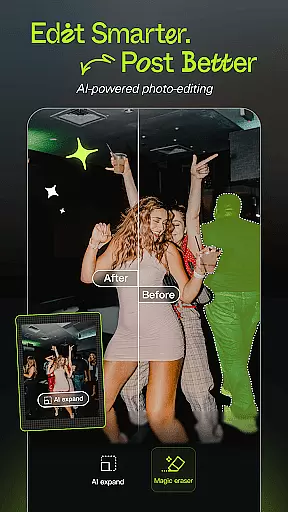
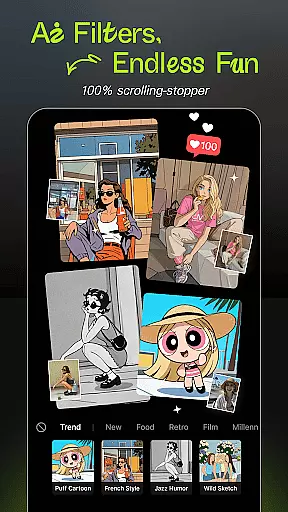

Hypic is an advanced AI-powered photo editing application that transforms ordinary photos into stunning works of art. With its cutting-edge AI technology, users can effortlessly remove backgrounds, generate avatars, cartoon themselves, or enhance image quality with just a tap.
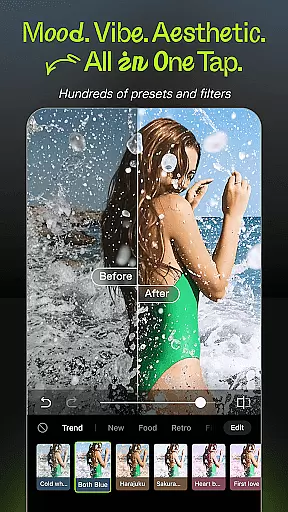
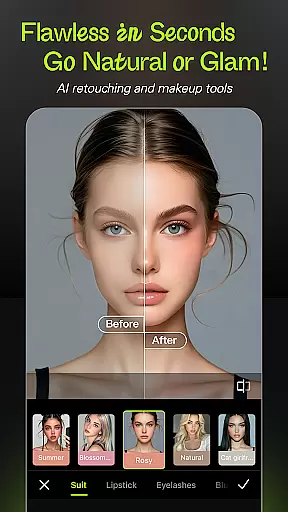
The app offers a wide range of stylish filters and effects, including retro film, clean girl presets, and soft glow filters, allowing users to match their mood or feed vibe instantly. Hypic also provides smart retouching tools for natural customization, precision in smoothing, reshaping, and enhancing facial features subtly and easily.
Hypic stands out with its powerful AI capabilities, enabling users to turn photos into artwork instantly. The AI-driven tools allow for background removal, avatar generation, cartoon transformations, and image quality enhancement without any prior editing experience.
In addition to AI magic, Hypic boasts a collection of aesthetic templates designed by professionals, making content creation effortless and visually appealing. Users can create stunning visuals in seconds, perfect for various platforms like Instagram, TikTok, and Pinterest.
The smart retouching tools offer natural customization options, allowing users to adjust facial features with subtlety and ease. Whether you're a casual editor, digital creator, or aesthetic lover, Hypic makes editing fun, fast, and easy.
Real-time capture and preview functionality is essential for ensuring that users can see the results of their photo edits instantly. Hypic offers a seamless experience where every adjustment, filter, or effect applied to an image is immediately visible, allowing users to make precise modifications.
The app leverages advanced AI technology to process changes in real time without compromising on quality. This ensures that whether you're adjusting facial features, applying aesthetic filters, or using professional templates, the preview accurately reflects the final output.
For content creators and casual editors alike, this feature saves valuable time and enhances creativity by providing instant feedback. Users can experiment with different styles and settings until they achieve their desired look, making photo editing both intuitive and enjoyable.
Ultimately, Hypic's real-time capture and preview capabilities empower users to produce high-quality visuals effortlessly, ensuring satisfaction and efficiency in their editing process.
Hypic stands out with its AI beauty and enhancement features that focus on maintaining natural aesthetics while improving image quality. The app uses sophisticated algorithms to smooth skin, reshape facial features, and enhance overall appearance without making edits look artificial.
One of the key aspects of Hypic's success in this area is its precision tools designed for subtlety. These tools allow users to customize their look naturally, ensuring that enhancements complement the original photo rather than overshadowing it.
Whether you're aiming for a polished Instagram post or a professional portfolio piece, Hypicu2019s AI-driven enhancements ensure your images retain authenticity. This balance between enhancement and realism sets Hypic apart from other photo editors.
By prioritizing natural-looking results, Hypic caters to digital creators and aesthetic lovers who demand both quality and genuineness in their edited photos, delivering stunning yet believable masterpieces every time.
AI-powered editing
Stylish filters
Smart retouching
Aesthetic templates
Batch editing
Subscription required
Limited free features
Internet connection needed
Privacy concerns
Learning curve

Photo prints, cards, & gifts at Walgreens. Easy ordering & fast local pickup !
 4.80
4.80
Take videos and pictures with the popular TikTok TIME WARP SCAN filter.
4.60
Light-weight Media Gallery app for Android made with Jetpack Compose
4.60
AI photo enhancer with Sora 2! Enhance, descratch, and colorize your old photos.
4.50
Collage your moments in one tap: 1000+ layouts, filters, stickers, and texts.
4.90
Easily view, share, delete photos with Gallery.
4.70
Hair color changer, AI haircut app, fun hair editor and buzz cut filter for all!
3.80
Astrophotography with your smartphone, photo live stacking and much more!
3.90
Pro version: AR sun/moon tracker for any date. Tool for photographers & planners
4.90
Find time and duration of different sunlight phases at any location
4.90
1M influencer's special filter
4.60
AI portrait generator and polaroid AI selfie, fun AI generated AI photo creator!
4.30
Create AI Photos, Improve and restore quality of blurry, old or damaged pics.
4.20
Transform Photos: Edit, Beautify and Craft Memories & Make Collages!
4.10
How old age camera Gender Swap App Face Shape Hairstyle App Hair Styler App fun!
4.00
Be your best in every shot! Fix, edit and retouch your face in selfies & photos.
3.70
Long exposure camera with computational photography
2.60
HD Photo gallery and photo manager to edit, hide private photos, videos & albums
4.0
Over 800 film simulation recipes for Fujifilm. Black Friday Offer!
4.4


User Reviews