





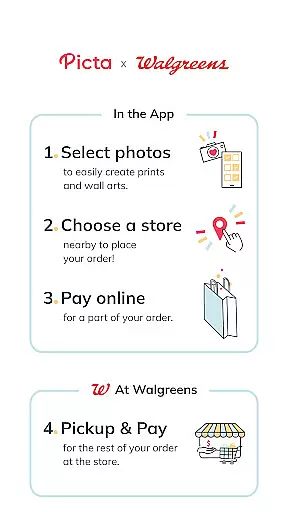
Picta is a photo printing app that allows users to print photos at Walgreens stores. With this app, you can easily select your photos, choose the print size and quantity, and pick up your prints in just one hour. Picta offers professional-quality photo printing services on Kodak paper in multiple sizes, including 4x6, 5x7, and 8x10 enlargements. You can also create personalized photo gifts such as magnets, posters, canvas, photobooks, greeting cards, and invitations.
One of the key features of Picta is its fast and safe photo transfer capability. The app organizes your mobile photos by date taken, making it easy to find and select the photos you want to print. Picta also provides an enhanced Walgreens store locator, allowing you to choose your local Walgreens store or a store near your friends and family for convenient pickup. With Picta, you can enjoy exclusive coupons and deals, making it a cost-effective option for printing your photos.
Picta offers a range of features that make photo printing quick and convenient. One standout feature is the ability to crop and zoom each picture easily within the app. This allows you to customize the appearance of your prints and ensure that they meet your expectations. Additionally, Picta offers real-time order status updates, so you can track the progress of your print job and know exactly when it will be ready for pickup.
Another notable feature of Picta is its photo collage creation tool. With this tool, you can create collages in four different layouts, each showcasing four of your favorite moments. This feature adds a creative touch to your prints and allows you to display multiple photos in a single frame. Picta also offers a gallery that organizes your mobile photos by date taken, making it easy to find and select the photos you want to print.
In addition to its photo printing capabilities, Picta also offers personalized photo gifts for all occasions. From magnets and posters to canvas and photobooks, you can transform your photos into unique and memorable keepsakes. Picta's wide range of products ensures that you can find the perfect gift for any occasion.
Real-time capture and preview functionality is essential for ensuring that users can accurately select and edit their photos before printing. The Picta app offers a seamless experience by allowing users to choose photos directly from their mobile devices with instant previews.
This feature enables users to crop and zoom each picture easily within the app, ensuring that the final print meets their expectations. By providing real-time feedback on how the printed photo will look, users can make necessary adjustments to achieve the desired outcome.
The ability to preview edits in real time significantly enhances user satisfaction. It eliminates the guesswork involved in photo editing, making the entire process more efficient and enjoyable. Users can confidently create custom prints, knowing exactly how they will appear when picked up at a Walgreens store.
Overall, real-time capture and preview not only streamline the photo printing process but also empower users to produce professional-quality prints with ease. This feature sets Picta apart as a reliable tool for transforming digital memories into tangible keepsakes.
AI beauty and enhancement features are increasingly popular in photography apps, offering users the ability to improve their photos with natural-looking effects. Picta incorporates advanced AI technology to enhance images while maintaining their authenticity.
With this feature, users can apply enhancements that automatically adjust lighting, color balance, and sharpness, ensuring that every photo looks its best. The AI algorithms are designed to preserve the original essence of the image, avoiding over-processing that can make photos appear artificial.
The naturalness of AI enhancements provides a significant advantage for users who want to elevate their photos without compromising their genuine appearance. Whether creating personalized gifts or simply printing cherished memories, users can trust that their photos will retain their true character.
By integrating AI beauty and enhancement tools, Picta ensures that every print reflects the highest quality and most authentic representation of the user's original photos, enhancing the overall photo printing experience.
User-friendly interface
Fast and convenient photo printing
Wide range of print sizes and products
Exclusive coupons and deals
Real-time order tracking
Limited to Walgreens stores
Requires internet connection
Print quality may vary
Additional charges for personalized gifts
Occasional app glitches

Long exposure camera with computational photography
 2.60
2.60
Add Watermark - Sign your pictures with a text or logo. Effective, quick, easy!
4.50
Shooting photos and records video easily and efficient with professional Camera
4.30
1M influencer's special filter
4.60
Future baby face generator: AI kids generator, kid face! What my baby look like?
4.40
Unblur, enhance & restore photos with powerful AI photo enhancer tools.
4.60
Catch sunlight, sunrise sunset times and sun phases with the AR sun tracker.
4.10
Remote control the phone camera shutter from your smartwatch and take a picture
1.60
Discover & download millions of art for The Frame TV or Hisense CanvasTV
4.60
A collection of tools and reference tables for DPs, ACs, DITs and Operators.
4.70
Cartoon and artistic effects for your photos and videos
4.70
PhotoSync Bundle Add-On License. Enables all features and services in PhotoSync.
4.60
Create Business Headshots, Polaroid Filter, Retake Photos,Profile Pics,AI Photos
4.50
Photo Exif Editor allows to view, add and modify EXIF data of multiple photos
4.50
Use AI Video Generator to turn your words to ai generated videos.
4.50
A light meter for true photographers.
4.20
Photobooth mini FULL app will allow you to add more fun to your parties
4.00
How old age camera Gender Swap App Face Shape Hairstyle App Hair Styler App fun!
4.00
Application for remote controlling DSLR
3.00


User Reviews