



PowerAudio Plus Music Player is a feature-rich audio player designed to deliver an exceptional music experience. With its intuitive interface and support for all major audio formats, it ensures seamless playback of your favorite tracks. The app allows you to organize music by albums, artists, playlists, or favorites, making navigation effortless.
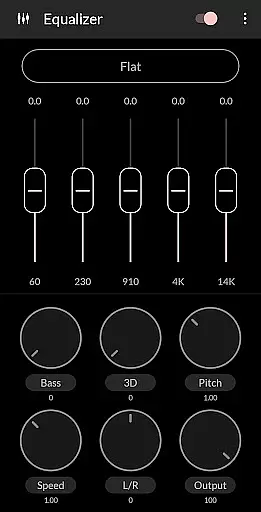
One standout feature is the powerful equalizer with BassBoost and Virtualizer, offering various presets and custom options to enhance sound quality. Whether you're creating personalized playlists or using the sleep timer, PowerAudio caters to diverse listening preferences while providing advanced functionalities like setting ringtones and sharing media files.
Ideal for audiophiles, this app supports high-quality audio playback and integrates practical tools such as headphone detection and background play. Its comprehensive features make it a top choice for managing and enjoying your music library on Android devices.
PowerAudio Plus Music Player boasts an impressive array of features that elevate the music listening experience. It supports multiple audio formats including MP3, WAV, AAC, and OGG, ensuring compatibility with virtually any file type. The built-in equalizer provides several presets along with BassBoost and Virtualizer effects, allowing users to fine-tune their audio output according to personal preferences.
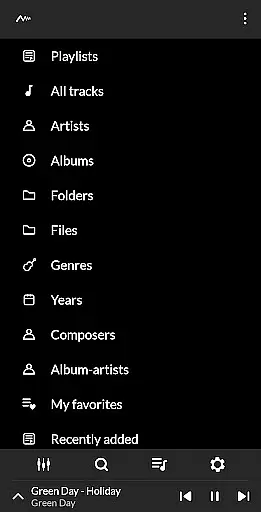
Beyond basic playback, the app offers robust organizational tools. Users can browse songs by albums, artists, playlists, or favorites, simplifying music management. Advanced options include multi-select functionality, custom queues, and the ability to create personalized playlists. Additional highlights are the sleep timer, repeat/shuffle modes, and the option to set phone ringtones directly from the app.
Practicality meets innovation with features like automatic pause upon headphone disconnection and background music playback. PowerAudio also displays codec details such as bitrate and sample frequency, giving tech-savvy users deeper insights into their audio files. These capabilities collectively ensure a versatile and user-friendly music player.
PowerAudio Plus Music Player offers an extensive music library that supports all major audio formats including mp3, m4a, wav, aac, amr, and ogg. This ensures that users can enjoy a wide variety of music without worrying about compatibility issues.
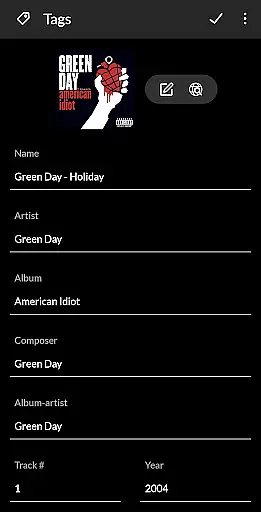
The application places a strong emphasis on copyright authenticity by providing features such as codec details which include information like bitrate, sample frequency, and channels. Users can be confident that the music they are enjoying is of high quality and legally obtained.
With the ability to browse songs by albums, artists, or playlists, PowerAudio Plus makes organizing and accessing your music collection effortless. The app also allows you to create your own playlists, adding a personal touch to how you experience your music.
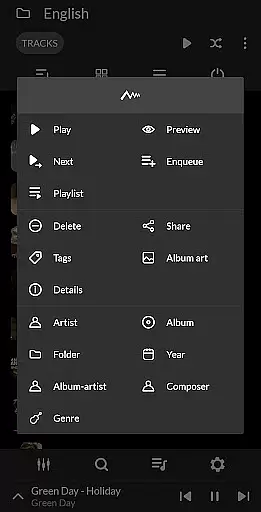
Moreover, the feature to set phone ringtones and share media files reflects the app's versatility beyond just playing music, enhancing its value as a comprehensive music management tool.
Delivering top-notch audio quality is at the heart of PowerAudio Plus Music Player's offerings. It boasts a powerful equalizer complete with BassBoost and Virtualizer, allowing users to customize their listening experience according to their preferences.
Users have the option to choose from a variety of music presets or even create their custom preset, ensuring that the audio output is always optimized for their unique taste in music.
In addition to superior sound quality, the app provides practical features such as detecting headphones and auto-pausing on disconnect, which not only protect the user's ears but also save battery life when the device is not in use.
Furthermore, with advanced capabilities like setting a sleep timer and sorting songs by date added or name, PowerAudio Plus enhances user convenience while maintaining exceptional audio fidelity throughout every listening session.
User-friendly interface
Wide format compatibility
Advanced equalizer settings
Customizable playlists
High-quality audio playback
No desktop sync
Limited visual themes
Occasional bugs
Ads in free version
Complex for beginners

Over 100 million tracks available for high quality streaming and download
 4.60
4.60
Tune in to the greatest hits on UK Radio | The home of Capital, Smooth & Heart.
4.90
Taal player that lets you sing any Indian & Western song with Tabla & Tanpura
4.60
A synth that really lets you shape your sounds!
4.50
Remove ads permanently from Music Visualizer
4.0
More downloads than any other metronome. Includes drum machine & tempo trainer.
4.80
Super Sound Editor, Song Maker & Mixer, Vocal Remover, Voice Recorder & Changer!
4.60
Reverse your voice & songs instantly! Fun singing challenge with cool effects.
4.60
Customize Your Favorite Songs and Videos with booster.
4.70
Gorgeous UI, Powerful music Search and Equalizer, the great choice for you!
4.70
AI Music Maker: Generate And Compose AI Tunes & AI Songs & AI Music & AI Melody!
4.60
Fun & Easy Voice Changer – Record, Edit & Add Hilarious Effects!
4.50
Time Guru will strengthen your internal sense of musical time via random muting.
4.30
Time Trainer: accurate metronome w tools to help you develop your internal time!
4.20
The official Sonos app
4.10
The ultimate media player for Android devices
3.90
USB audio recording and playback finally possible on Android 3.1 or higher!
3.90
The iconic iOS metronome app is now on Android.
3.70
Control your MIDI USB or Bluetooth devices in app and avoid some trampling
3.30


User Reviews