
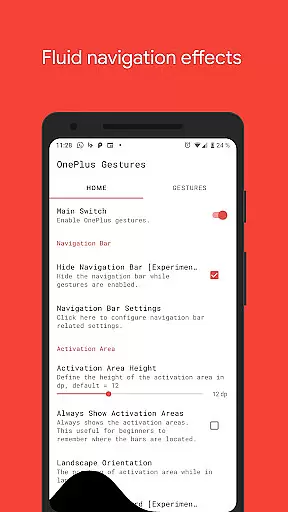
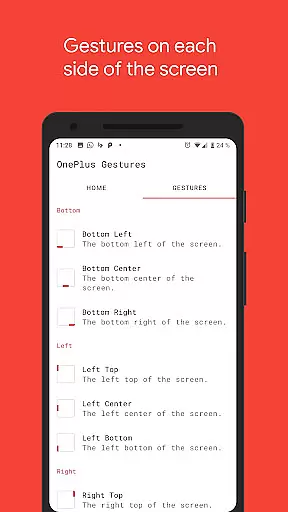
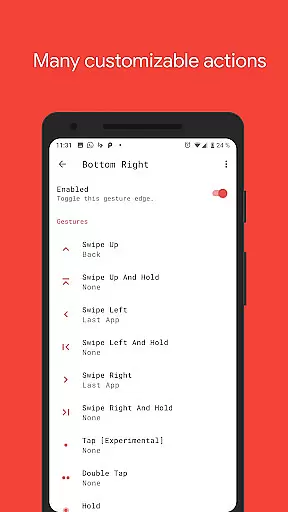
Vivid Navigation Gestures is a powerful tool that revolutionizes the way you interact with your Android device. This app allows users to control their devices through intuitive gestures instead of traditional button presses, bringing a modern and fluid user experience.
With features like beautiful visual effects during gesture execution, multiple trigger points, and a wide range of customizable actions, this app caters to power users who want more control over their navigation. Whether launching Google Assistant, toggling split screen, or taking screenshots, Vivid Navigation Gestures offers an extensive suite of functionalities that enhance productivity and ease of use.
The app also supports advanced options such as hiding the stock navigation bar using ADB or root access, making it ideal for tech-savvy individuals looking to maximize screen real estate and streamline their device interaction.
Vivid Navigation Gestures stands out with its comprehensive set of features designed to provide a seamless navigation experience. The app includes fluid visual effects that accompany each gesture, enhancing the overall aesthetic appeal while maintaining functionality.
Users can choose from multiple gesture triggers located across different areas of the screen, including bottom left, center, right, and various points along the sides. Each trigger supports a variety of gestures such as swipe up, swipe left, double tap, and hold, allowing for highly personalized navigation schemes.
Moreover, the app provides numerous actionable commands ranging from basic navigation tasks like 'Back' and 'Home' to more complex operations such as toggling auto-rotation, opening quick settings, and even controlling media playback. These capabilities ensure that users have complete control over their device's behavior without needing physical buttons.
Gestures are revolutionizing the way users interact with their devices, and Vivid Navigation Gestures excels in this domain. The app allows users to replace traditional button presses with intuitive gestures, providing a seamless navigation experience across their Android device.
With multiple gesture triggers available, such as swiping from different edges of the screen, users can execute a variety of actions like launching Google Assistant, going back, returning to the home screen, or even taking screenshots. This extensive range of customizable gestures ensures that users can tailor the functionality to their specific needs.
The app also includes fluid visual effects during gesture execution, enhancing the overall user experience. These animations not only make the interactions feel more natural but also provide visual feedback, confirming that the gesture has been recognized by the system.
By utilizing accessibility services, Vivid Navigation Gestures can programmatically perform essential navigation functions without collecting any personal data. This approach ensures both functionality and privacy, making it an effective tool for improving device interaction.
Vivid Navigation Gestures offers an interface that simplifies the complexity of gesture controls, making it accessible even to users who may not be tech-savvy. The straightforward setup allows individuals to quickly adapt to using gestures instead of relying on physical buttons or traditional navigation methods.
Users can choose from various predefined gestures, such as swipe up, swipe left, or double tap, each linked to specific actions like opening notifications or recent apps. This intuitive mapping between gestures and actions reduces the learning curve typically associated with new navigation systems.
In addition to its ease of use, the app provides beautiful visual effects while performing gestures. These effects contribute to an engaging and enjoyable user experience, reinforcing the connection between the action performed and the result on the screen.
For those looking to hide the stock navigation bar, Vivid Navigation Gestures offers a solution that requires minimal technical knowledge, although certain features might need ADB or root access. Overall, the app strikes a balance between powerful functionality and user-friendly design, ensuring that gesture-based navigation is both simple and effective.
Intuitive gesture controls
Beautiful fluid effects
Highly customizable
Wide range of actions
Advanced nav bar options
Requires ADB setup
Root access needed
Complex for beginners
Limited iOS support
Permissions required

Unlock your Essential Key. Create custom shortcuts to your favorite apps!
 4.2
4.2
Family Locator, Share location, StayConnect with your family in real time
3.90
App to pay for FUTO Keyboard
4.60
An easy-to-use calculator designed to save time calculating and bending conduit
4.30
With videos, electrical calculators, and built-in ebook, Ugly’s has your answer.
4.50
The Ultimate Bluetooth Keyboard & Mouse. Securely control your PC, Mac, and more
4.50
Pro Emulator is an easy to use game console emulator for a range of consoles.
4.40
Enjoy a smooth mobile reading experience!
3.60
fast and easy mp3 music downloader
4.80
Connect wirelessly to your computer to watch movies, browse the web, play games
5.00
Change your GPS location instantly. Simulate routes anywhere in the world.
4.90
Excellent scientific calculator with symbolic algebra, integrals, derivatives
4.80
Connect instantly to a fast, encrypted VPN with one tap
4.60
Canon PRINT is a companion app for your Canon printer.
4.60
Play your X-Box games remotely in 1080p with any controller and zero latency
4.60
PC precision for mobile gaming: dominate with keyboard and mouse!
4.30
Automate everything from settings to photos, SMS to speech. ADC2 prize winner.
4.10
Detect hidden spy camera with advanced scanning {{ Premium version }}
4.00
Create your own live wallpaper or check out thousands already made presets
3.90


User Reviews