
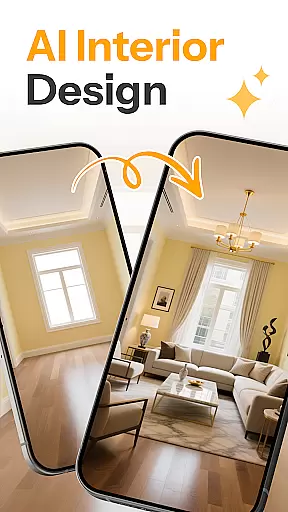

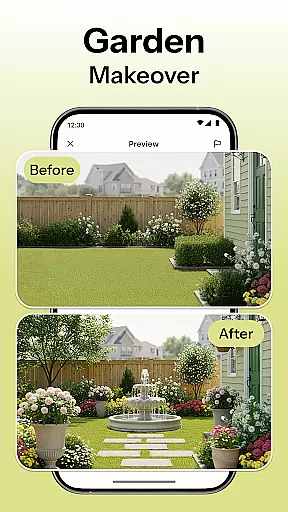
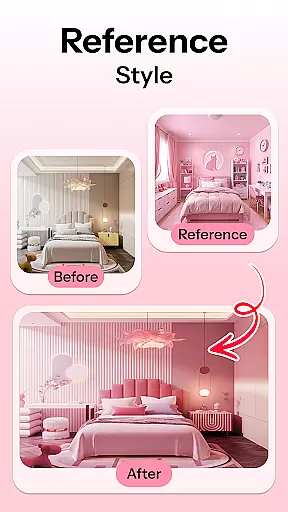
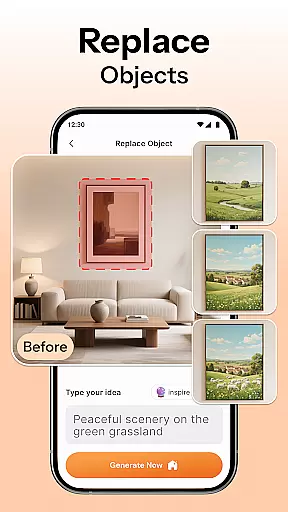
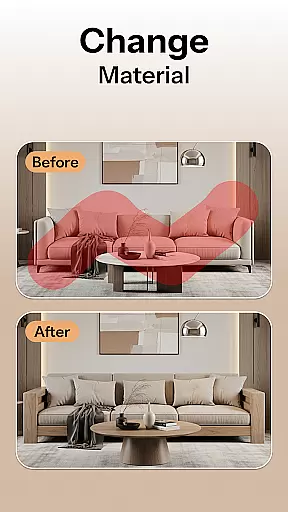
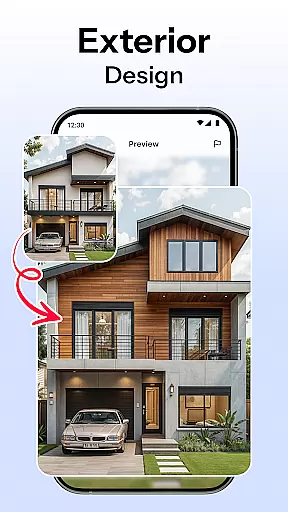

HomeMagic is an innovative AI-powered interior design application that transforms the way users approach home decoration. The app's core functionality lies in its ability to instantly generate professional-grade room designs based on user-provided photos and selected styles. Whether you're redesigning a single room or planning a complete home makeover, HomeMagic provides realistic visualizations across various design themes including Modern, Retro, and Bohemian.
The application stands out with its comprehensive set of features that cater to different aspects of interior design. Users can experiment with furniture placement, wall colors, flooring options, and decorative elements through an intuitive interface. The before-and-after comparison tool allows for easy evaluation of design changes, while the saved designs gallery helps organize ideas for future implementation. This makes HomeMagic particularly valuable for homeowners, renters, and design professionals who need practical visualization tools.
One notable use case is for real estate agents who want to showcase properties with improved interior aesthetics. By using HomeMagic's AI suggestions, they can virtually stage homes, making them more appealing to potential buyers without physical renovations. This digital staging capability saves time and resources while delivering impressive results, demonstrating how artificial intelligence can revolutionize traditional interior design processes.
HomeMagic distinguishes itself through a robust set of features designed to streamline the interior design process. The AI Interior Design Generator serves as the cornerstone functionality, allowing users to upload space photographs and receive multiple design variations within seconds. This feature supports an extensive range of styles from Tropical to Cyberpunk, ensuring there's an option for every taste and requirement.
The application's Room Makeover Preview goes beyond simple image manipulation by providing realistic design transformations. Users can visualize complete room overhauls, including furniture arrangement, lighting modifications, and decorative element placements. The Smart Furniture Layout Planner takes this further by offering optimized space utilization suggestions, helping users make informed decisions about their room configurations.
Additional features include advanced style filters for experimenting with different aesthetic combinations and a comprehensive save/share system for organizing design ideas. The Before & After Comparison tool enables precise evaluation of design changes, while the high-quality export function facilitates professional presentations. These capabilities collectively create a powerful platform that bridges the gap between amateur decoration attempts and professional interior design services.
HomeMagic offers a comprehensive suite of creative tools that cater to all your interior design needs. The AI Interior Design Generator allows you to upload photos and transform spaces with various styles such as Modern, Retro, and Bohemian, ensuring that every detail is customizable.
In addition to style transformations, the app provides a Smart Furniture Layout Planner. This feature uses artificial intelligence to suggest optimal arrangements for furniture, lighting, and wall art, helping you make the most of your space while maintaining aesthetic appeal.
The Home Decor Ideas & Style Filters enable experimentation with different wall colors, flooring textures, and trendy furniture sets. These options ensure that users can explore countless combinations to find their perfect interior design match, making HomeMagic an indispensable tool for both novice decorators and professional designers.
Flexibility in design formats is crucial for any creative endeavor, and HomeMagic excels in this area. The app supports high-quality image uploads, allowing users to work with detailed photographs of their spaces. This ensures that the AI-generated designs are not only beautiful but also highly accurate representations of potential makeovers.
Users can visualize changes in a variety of formats, including before-and-after comparisons. This feature lets you see the current state of your room alongside the AI-designed version, providing clear insights into how each element will look post-renovation.
Furthermore, HomeMagic allows you to save and organize your designs in a personal gallery. You can export these designs in high resolution, making it easy to share your visions with friends, family, or professional interior designers. This level of format flexibility empowers users to bring their dream spaces to life effortlessly.
User-friendly interface
Wide style variety
Quick rendering speed
Professional quality output
Comprehensive feature set
Premium feature costs
Internet connection required
Device compatibility issues
Learning curve for beginners
Limited customization depth

Create stunning video, photo & magic from text with FlixAI GPT video generator.
 3.10
3.10
AR Anime Drawing: How to draw anime with AR drawing & sketching apps!
4.00
Turn your drawings into flipbook-style animations with simple creative tools
4.60
Minecraft & Roblox Clothes
4.70
Get creative and make art with your Sesame Friends!
4.00
Mobile pixel art editor. Simple. Fast. Portable.
4.80
Resize photos and print photos in exact size with our powerful photo printer!
3.80
Get an overview over all your embroidery threads, projects and more.
4.60
Sketch and paint on your device with the feel and freedom of drawing on paper
4.00
Make your phone cooler and have a fantastic experience
4.80
Discover Cartoon Dream : Unleash Your Creativity with CuttingEdge AI
4.50
Share the joy of painting with ibis Paint! Drawing anime and manga art.
4.50
Draw, make movies & animate cartoons easily with our 2D animation maker app
4.40
Turning simple sketches into captivating tales filled with life and motion
3.90
Paint with oils and sketch with natural tools on a realistic virtual canvas.
3.80
AI Face Swap, Video Effects Editor, Realtime Morph, Funny Video FX,AI Filters
3.70
Apply cartoon, caricature, and portrait effects to make your photos stand out!
3.60
Sketch, trace and master AR drawing with awesome anime art!
3.30
Art of Combination Wear OS Watch Faces
4.2


User Reviews