
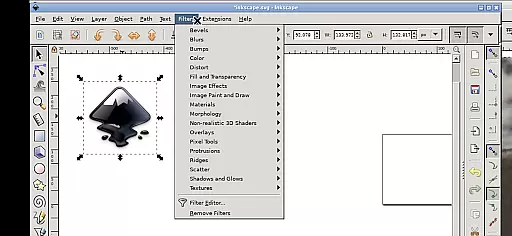
Inky is a powerful vector graphics editor that brings the full functionality of Inkscape to your Android device. This app allows users to create and edit vector images in Scalable Vector Graphics (SVG) format, while also supporting other file formats for import and export. With professional support and open-source licensing, it provides a complete design solution on the go.
The application supports primitive vector shapes such as rectangles, ellipses, polygons, arcs, spirals, stars, and 3D boxes, along with text manipulation. Users can fill objects with solid colors, patterns, gradients, and adjust transparency levels. The app also enables tracing of raster graphics, transformations like moving, rotating, scaling, and skewing, making it an indispensable tool for designers.
Inky stands out with its comprehensive set of features tailored for vector graphic design. The app supports advanced functionalities such as embedding and tracing raster graphics, creating complex vector shapes, and applying various color fills and strokes. Its touch-optimized interface allows users to perform actions like zooming, panning, and scrolling through intuitive gestures.
One of the key highlights is its seamless integration with Android's file system, providing easy access to documents and pictures without the need for importing or exporting files. Additionally, the app offers flexibility with input methods, allowing users to work comfortably on both tablets and smartphones. Whether you're a professional designer or a hobbyist, Inky delivers a robust platform for all your vector graphic needs.
In the realm of digital art and design, having a comprehensive set of tools is paramount. Inky, an adaptation of the renowned Inkscape software, brings the full suite of vector graphic editing capabilities to your Android device. This includes the ability to create primitive shapes such as rectangles, ellipses, polygons, arcs, spirals, stars, and even 3D boxes.
Moreover, users can manipulate these objects with advanced features like filling them with solid colors, patterns, or gradients, and adjusting transparency levels for both fills and strokes. The app supports embedding raster graphics and offers optional tracing functionalities, allowing designers to transform photos and other raster images into scalable vector artwork.
The versatility of Inky extends to its transformation tools, enabling creators to move, rotate, scale, and skew their designs with precision. These robust features ensure that artists and designers have everything they need to bring their visions to life directly on their mobile devices.
Flexibility in canvas size and format options is crucial for accommodating diverse design projects. Inky provides users with the adaptability needed to work on various project types without limitations. Whether you're designing for print, web, or any other medium, this app allows you to customize your workspace to fit specific requirements.
Designers can seamlessly import and export files in multiple formats, including the widely-used Scalable Vector Graphics (SVG) format. This ensures compatibility across different platforms and applications while maintaining high-quality standards. Additionally, Inky facilitates access to files from all over the Android system through useful links in the home directory, eliminating the need for cumbersome file imports or exports.
With support for adjustable desktop scaling via Android notifications settings, users can optimize their view for comfort and precision. Although changes require an app restart, this feature enhances usability on both tablets and smartphones, making Inky a versatile choice for creatives who demand both power and flexibility in their design toolkit.
User-friendly interface
Extensive file format support
Advanced vector tools
Open-source and free
Professional support available
Steep learning curve
Performance may vary on older devices
Limited native Android optimizations
Requires technical knowledge for setup
Interface not fully adapted for small screens

Create sweet, cool and unique couple avatars easily, in just a few steps!
 3.40
3.40
Draw anime & manga drawing, art with templates to create stunning picture!
4.50
AI Art Generator transforms your words into AI generated art & paintings.
3.70
Create stunning art with AI.
4.80
Painting, drawing, & sketching
4.50
Retouch photos. Create or edit images. Endless capabilities.
2.70
Beauty Camera - Selfie Camera is the ultimate beauty camera and selfie app
4.30
Create cute cat emojis & PFPs! Fun, custom avatars for cat lovers.
3.70
Sketch and paint on your device with the feel and freedom of drawing on paper
4.00
See Color, Paint Color
4.90
Photo stitcher for automatically screenshot stitching into a long screenshot
4.70
Digital, Abstract, Classic - all types of color wheels in one app!
4.60
Discover Cartoon Dream : Unleash Your Creativity with CuttingEdge AI
4.50
Create stylish invitation cards using templates for weddings, birthdays & RSVP.
4.20
Easy 3D drawing design maker & creator. Model designing, Sculpting. Create&paint
4.00
AI Face Swap, Video Effects Editor, Realtime Morph, Funny Video FX,AI Filters
3.70
Apply cartoon, caricature, and portrait effects to make your photos stand out!
3.60
AI Assistant, powered by ChatGPT GPT-4 & GPT-4o. Your intelligent companion.
3.50
Pose and morph realistic male and female models! 3D poser app
3.00


User Reviews