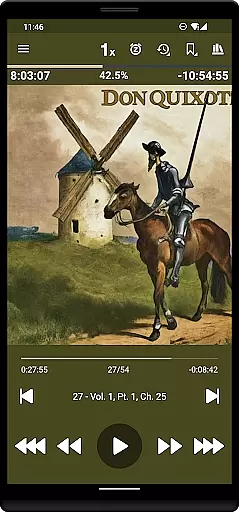
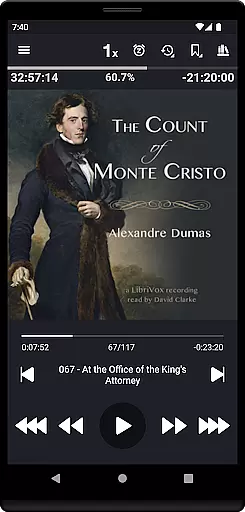
Listen Audiobook Player is a feature-rich audio player designed for audiobook enthusiasts who value flexibility and control. This app allows users to play DRM-free content from various sources, including popular platforms like Librivox, Downpour, and Loyalbooks. With support for multiple audio formats such as MP3, M4B, and FLAC, it ensures compatibility with a wide range of audiobooks.
The application offers advanced playback features including variable speed control, pitch adjustment, and an equalizer for personalized listening experiences. Its seamless integration with Android Auto, Plex, and Audiobookshelf enhances accessibility and convenience. Whether you're commuting or relaxing at home, Listen Audiobook Player provides a comprehensive solution for managing and enjoying your audiobook library.
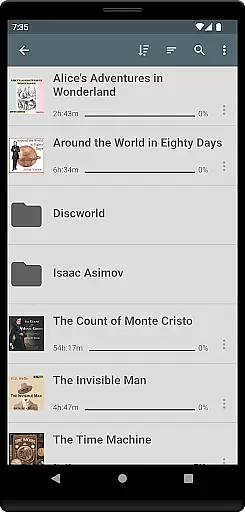
One of the standout features of Listen Audiobook Player is its robust organizational capabilities. The folder-based library automatically syncs with your audiobook folder, allowing each book to be placed in its own directory. This structure supports subfolder organization and offers both folder browsing and a unified book list view. The search functionality enables quick access to any book in your collection.
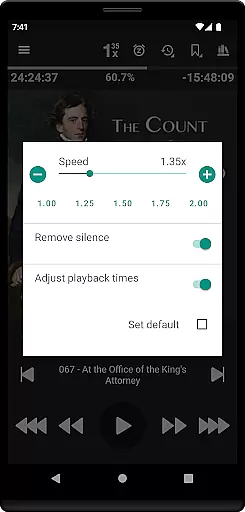
Beyond organization, the app excels in customization and control. Users can adjust playback speed from 0.5x to 4x, trim silence, and apply pitch correction. The inclusion of an equalizer and volume boost ensures optimal sound quality. Additionally, the app supports embedded chapters, cover art integration, and bookmarking features that enhance user interaction and provide a richer listening experience.
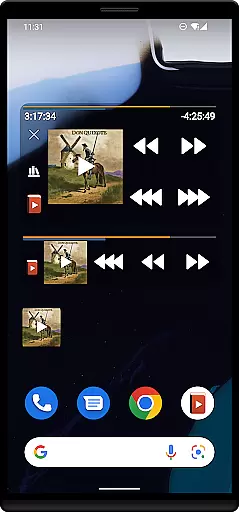
Listen Audiobook Player also includes practical functionalities such as sleep timers, Bluetooth controls, and widgets. These features cater to user convenience, allowing for hands-free operation and personalized settings. Integration with external services like Tasker and Llama further extends the app's versatility, making it a top choice for audiobook aficionados seeking a customizable and efficient listening tool.
When evaluating an audiobook player, the size and variety of its music library are crucial factors. Listen Audiobook Player offers access to a vast collection of DRM-free books from various sources like Librivox, Downpour, and Loyalbooks. This ensures users have a wide selection of content to choose from.
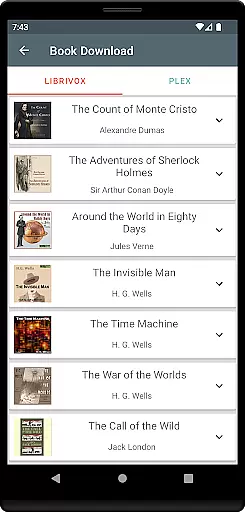
The app allows users to download curated books directly from Librivox, featuring classic titles such as 'The Count of Monte Cristo' and 'Pride and Prejudice'. By supporting multiple audio formats including mp3, m4b, and flac, the application caters to diverse user preferences while maintaining copyright authenticity.
With integrations for Plex and Audiobookshelf, users can easily download books from their hosted servers, enhancing accessibility. The availability of numerous public domain works ensures that users can enjoy a rich library without concerns about copyright infringement.
Audio quality is paramount for an immersive listening experience. Listen Audiobook Player excels in this area by supporting high-quality audio formats and offering advanced playback features. Users can enjoy variable playback speeds ranging from 0.5x to 4x, allowing personalized listening experiences tailored to individual preferences.
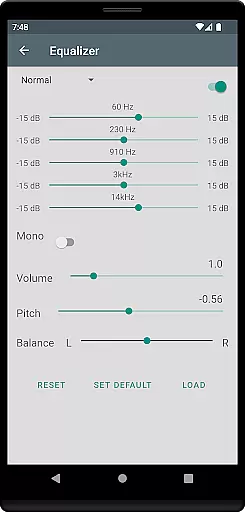
The app includes pitch control, volume boost, and an equalizer, enabling users to fine-tune audio output. These features ensure that listeners can optimize sound quality according to their specific needs and environments, whether they're at home or on the go.
Additional functionalities like trimming silence and balance adjustments further enhance audio clarity. By providing these comprehensive audio quality options, Listen Audiobook Player delivers a superior listening experience that meets the demands of even the most discerning audiophiles.
User-friendly interface
Wide format compatibility
Advanced playback options
Seamless integrations
Comprehensive bookmarking
No cloud storage
Limited language support
Complex setup required
Occasional bugs
Heavy on resources

Make music anywhere. Turn your device into an instrument.
 4.0
4.0
DJ Music Mixer - DJ Remix: remix songs, make beat music & record mix of DJ.
4.40
Network/Cloud Streaming, Visualization, Graphic Equalizer and Sound Effects.
4.20
The ultimate media player for Android devices
3.90
Record, Mix & Master with all n-Track effects, 64-bit audio and Stem Separation.
4.70
No wifi music app. Mp3 offline. Tuner radio, young radio music. Music downloader
4.20
PowerAudio is a powerful offline music player.
4.20
One-tap booster for max volume - enjoy powerful sound with this audio booster
4.50
Customize Your Favorite Songs and Videos with booster.
4.70
Reverse your voice & songs instantly! Fun singing challenge with cool effects.
4.60
Play KORG’s revolutionary touch-based instrument on a variety of devices.
4.40
Powerful 10-Band equalizer pro with sound booster improves Android audio quality
4.30
Your HD audio recorder on the go for music, meetings, ambience, animal sounds…
4.30
Master Salsa Rhythm quickly and with a lot of fun!
4.30
Time Trainer: accurate metronome w tools to help you develop your internal time!
4.20
The alternative folder based music player.
4.20
A sleek, no-frills player designed for true music lovers.
4.20
Turn your phone into a musical instrument from the future!
3.90
Powerful beat maker & DJ mixer to remix tracks, make music, & perform DJ mix
3.70


User Reviews