






Photo Collage Maker - FunPic is a versatile photography app designed to help users create stunning photo collages and video stories. With over 300 layouts, the app allows you to combine photos into eye-catching designs while offering unique shapes and grid options for more creative freedom. The intuitive interface makes it easy to decorate your memories with filters, text, stickers, and weekly updated materials.
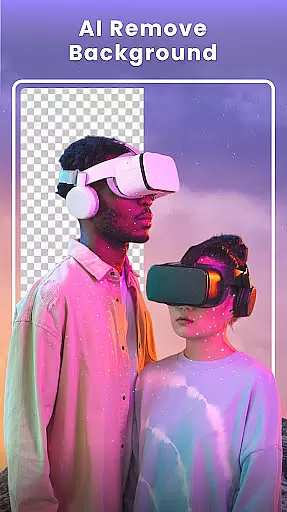
Beyond basic collage creation, FunPic provides advanced AI tools like background removal, object erasing, and cartoon avatar generation. You can also merge videos and photos into dynamic stories, complete with music or voiceovers. Whether you're crafting an Instagram feed or reliving special moments through slideshows, this app offers all the tools needed to express your creativity and share your story effortlessly.
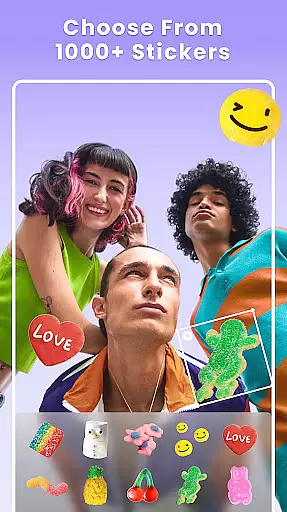
FunPic stands out with its rich material library and customization options. It includes 1,000+ stickers, themed templates, artistic filters, and doodle brushes that let users personalize every collage. The app supports both photo and video editing, enabling seamless transitions between formats. For instance, you can add music from built-in tracks or your device's storage, adjust aspect ratios for social media platforms, and use blur effects for professional-grade results.
The AI-powered features are particularly innovative. Users can remove unwanted objects, change backgrounds automatically, and refine edges with precision. Additionally, the freestyle mode allows complete creative control by letting you drag, drop, resize, and rotate images freely on the canvas. These capabilities ensure that whether you're making simple collages or complex visual narratives, FunPic adapts to your needs.
Real-time capture and preview functionality is essential for any photography app as it allows users to see exactly what their photo will look like before taking the shot. This feature ensures that users can make necessary adjustments on the fly, resulting in higher quality images.
Photo Collage Maker - FunPic offers a dynamic real-time preview system that lets users experiment with different collage layouts, filters, stickers, and text overlays while seeing the changes instantly. The app provides over 300 layouts and countless customization options, ensuring that every user can find the perfect fit for their creative vision.
With this immediate feedback, users can fine-tune their creations, such as adjusting borders, spacing, or adding artistic doodles, without any guesswork. This saves time and enhances the overall user experience by making photo editing intuitive and enjoyable.
The ability to preview edits in real-time not only boosts creativity but also increases user confidence in their final product. Whether combining photos and videos into stories or crafting photo slideshows, users can be assured of the results, leading to more engaging and visually appealing collages.
AI beauty and enhancement features are becoming increasingly popular in photography apps, offering users the ability to enhance their photos naturally without sacrificing authenticity. These tools help users refine their images while maintaining the original essence of the photograph.
FunPic's AI-powered tools provide an array of enhancements, from automatic background removal to object elimination, ensuring that every photo looks its best. The AI editor helps users create spotless images by removing unwanted distractions, allowing the main subject to shine through effortlessly.
In addition to background editing, the app offers artistic filters, stickers, and text options that add a touch of magic to photos. Users can apply unique blur effects, crop, and rotate their images to achieve ideal composition. These features ensure that enhancements are seamless and natural-looking.
By leveraging advanced AI technology, Photo Collage Maker - FunPic delivers professional-quality photo editing capabilities to users of all skill levels. This empowers users to express their unique style and share their enhanced photos with confidence, knowing that the final result preserves the authenticity of their cherished moments.
User-friendly interface
Extensive template library
Advanced AI tools
Versatile editing options
Regular content updates
Premium features locked
Ads may interrupt workflow
Occasional bugs reported
Learning curve for new users
Limited free export quality

AI portrait generator and polaroid AI selfie, fun AI generated AI photo creator!
 4.30
4.30
Long exposure camera with computational photography
2.60
Take videos and pictures with the popular TikTok TIME WARP SCAN filter.
4.60
The #1 app for B&W film developing featuring an advanced darkroom timer.
4.10
A reflected light meter with spot metering and incident light metering.
4.40
Raw Image Viewer. Gallery with support of raw images (.cr3, .cr2, .nef, .raf).
2.00
PhotoSync Bundle Add-On License. Enables all features and services in PhotoSync.
4.60
The original Rarevision VHS look seen everywhere!
4.70
Remote control the phone camera shutter from your smartwatch and take a picture
1.60
AI Photo Editor with 100+ Filters, Effects! Remove BG, Retouch & Photo Enhancer.
4.80
Movie camera, supports pro recording settings for filming. Try it and be amazed!
4.50
Edit like a pro with Hypic. Apply filters, AI effects, & magic touch.
4.40
Smart, light, and fast photo and video gallery
4.30
All-in-One Editor & AI Photo Enhancer, Beautify & Retouch, Collage, Cartoonify
4.20
Luminar: Photo Editor - easy picture editing with AI
4.20
Catch sunlight, sunrise sunset times and sun phases with the AR sun tracker.
4.10
Gallery Slideshow is slideshow maker app for slideshow from your gallery photos.
3.90
Astrophotography with your smartphone, photo live stacking and much more!
3.90
USB Storage Access for Photos, Videos, Music and Documents
3.80


User Reviews