
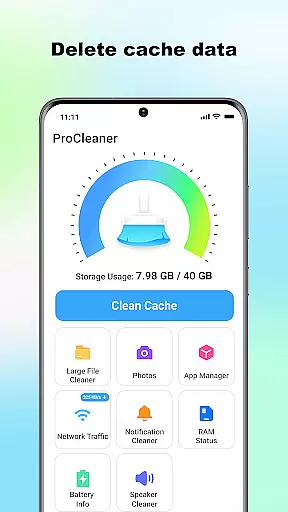
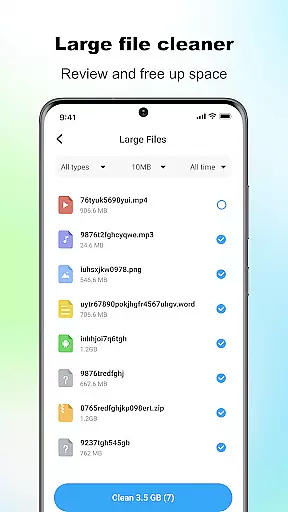
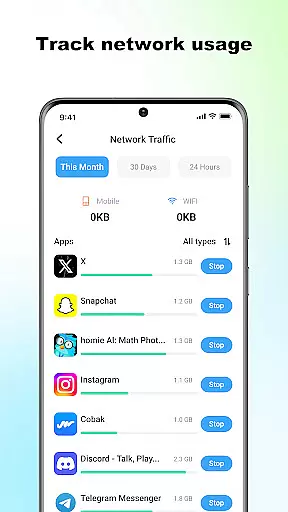
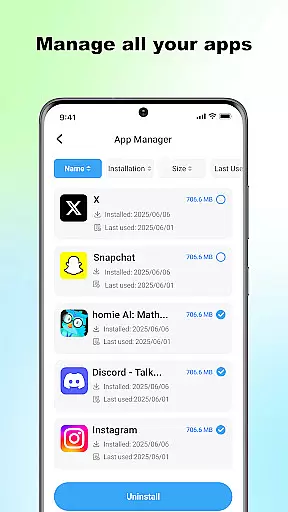
ProCleaner is a comprehensive device optimization tool designed to help users efficiently manage their smartphone storage. The app's core functionality revolves around scanning and cleaning various types of unnecessary files, including cache, residual, and junk files that accumulate over time.
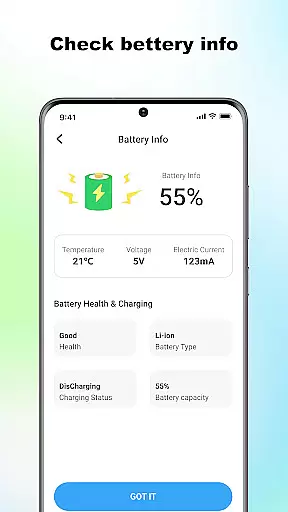
Beyond basic cleaning capabilities, ProCleaner offers advanced features for managing large files and uninstalling multiple applications simultaneously. Users can also monitor network speed and check battery status, providing a complete solution for device maintenance and performance optimization.
This application is particularly useful for individuals who frequently encounter storage issues or wish to maintain optimal device performance. By providing both basic and advanced tools for file management and system monitoring, ProCleaner delivers significant value to users looking to maximize their device's efficiency while maintaining control over their installed applications and system resources.
ProCleaner distinguishes itself through a robust set of features designed to optimize device performance. The application employs advanced scanning algorithms to identify and clean various types of unnecessary files, including cache, residual, and junk files that often go unnoticed by users.
A key differentiator is its ability to manage large files effectively while offering batch uninstallation of applications, saving users considerable time and effort. The integrated network speed monitor and battery status checker provide real-time information about crucial device metrics, enabling users to make informed decisions about their device usage.
The app requires specific permissions to function optimally, including storage access for file management and app usage permission for application control. These features collectively contribute to a comprehensive device optimization solution that addresses multiple aspects of smartphone maintenance and performance enhancement.
ProCleaner excels in delivering accurate and effective core functions that enhance device performance. The app meticulously scans and cleans cache files, ensuring no unnecessary data occupies your storage space. It also removes residual and junk files left behind by uninstalled apps or system operations, freeing up valuable memory.
In addition to file cleaning, ProCleaner offers a robust feature for managing large files. Users can easily identify and remove sizable files that contribute to storage clutter. The app's ability to uninstall multiple applications simultaneously further streamlines the device management process, saving time and effort.
Another key aspect is its network speed monitoring and battery status checking features. These tools provide real-time insights into device performance, helping users optimize their usage patterns. With all operations performed locally, ProCleaner ensures user privacy while maintaining high standards of functionality.
The interface of ProCleaner is designed with simplicity and intuitiveness in mind, making it accessible for users of all technical backgrounds. Upon launching the app, users are greeted with a clean and organized layout that highlights essential functions without overwhelming them with unnecessary details.
Each feature, from cache cleaning to application management, is presented with clear labels and straightforward navigation paths. This design philosophy ensures that users can quickly locate and utilize the tools they need without a steep learning curve. The app's intuitive control scheme allows even novice users to efficiently manage their device storage.
Moreover, ProCleaner maintains consistency in its visual presentation and interaction patterns. This uniformity enhances user experience by reducing cognitive load, allowing users to focus on optimizing their device rather than deciphering complex menus. Overall, the app strikes an excellent balance between powerful functionality and user-friendly design.
Comprehensive cleaning tools
Batch app uninstallation
Real-time network monitoring
Advanced file management
Local data processing
Requires storage access
Needs app permissions
Limited to local operations
No cloud backup option
Basic UI design

 4.10
4.10
Just swipe the edge to do something!
4.40
Head tracking for PC sim games such as MSFS 2024 or Elite:Dangerous. No headset!
4.50
Create your own live wallpaper or check out thousands already made presets
3.90
Signal Strength, Mobile, Wifi, Speed Test, Bad Signals, Cellular, 5G, LTE, 4G
4.20
PC precision for mobile gaming: dominate with keyboard and mouse!
4.30
Support Fossify apps with a warm thank you!
5.00
A clean app.
4.50
fast and easy mp3 music downloader
4.80
Optimize your WiFi network, turn your phone into Wifi Analyzer
4.70
ADB support Android 4.X-Android 13(Support wireless pair mode).No root required!
4.70
NFC Tools can read and write NFC tags.
4.70
Creation, Learning, Entertainment & More — The All-in-One AI Search Engine
4.70
Mirror your screen to Chromecast and Android TV - Super fast and simple
4.60
Screen Mirroring for Roku Sticks, Roku TCL TV and Roku Hisense TV
4.50
Forza Tuning Calculator App for Forza Horizon 5, Motorsport and Earlier Titles
4.40
VESC Tool can monitor and configure VESC-compatible devices over BLE and Wifi
4.20
Introducing Smart Printer, your ultimate destination for printing solutions!
4.00
Smart and comfortable browsing experience.
3.80


User Reviews