



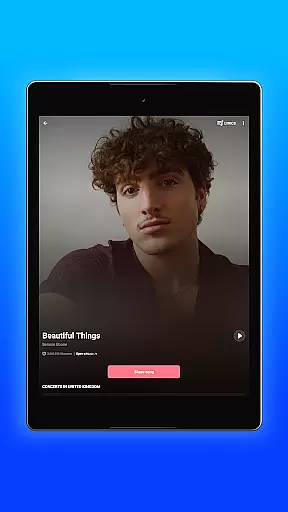


Shazam is a powerful music identification app designed specifically for Android Wear devices. It allows users to instantly recognize songs playing around them, even with headphones on. The app not only identifies tracks but also provides detailed information about artists, song lyrics, and upcoming concerts. With over 2 billion installs worldwide, Shazam has become an essential tool for music lovers who want to discover new content seamlessly while on the go.
Beyond basic song recognition, Shazam offers advanced features tailored for wearable devices. Users can access their complete song history, enjoy time-synced lyrics, and watch music videos directly through Apple Music or YouTube. The app's Auto Shazam feature enables continuous music detection, even when you're using other apps or offline. Whether you're commuting or attending live events, Shazam ensures you never miss an opportunity to discover your next favorite track.
Shazam stands out in the Android Wear category due to its comprehensive feature set optimized for wearable technology. The app's core functionality lies in its ability to identify songs almost instantly, storing each discovery in a centralized song history. This makes it easy for users to keep track of all identified tracks over time. Additionally, Shazam integrates seamlessly with major streaming platforms like Apple Music, Spotify, and YouTube Music, allowing direct playback from the app itself.
One of Shazam's most innovative features is its cross-platform compatibility. Through the Notification Bar, users can identify music playing in any app, including Instagram, YouTube, and TikTok. The dedicated Shazam Widget enables quick access from the Home Screen, while offline mode ensures functionality regardless of internet connectivity. For power users, Auto Shazam provides continuous background scanning, making it perfect for capturing multiple songs during live performances or DJ sets.
Shazam offers seamless companion app integration, allowing users to identify songs across various platforms effortlessly. Whether you're on Instagram, YouTube, or TikTok, the app works in tandem with these services through the Notification Bar.
The synchronization between Shazam and other music apps like Apple Music, Spotify, and YouTube Music is a testament to its cohesive ecosystem approach. This ensures that once a song is identified, it can be directly accessed or saved in your preferred music streaming service without any hassle.
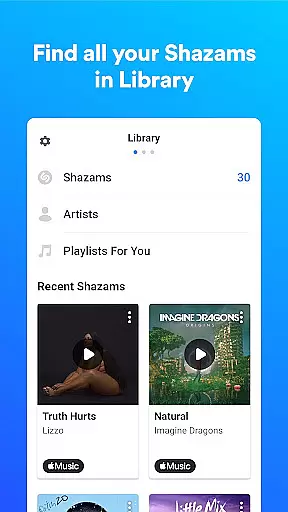
For users who enjoy tracking their musical discoveries, Shazam's ability to store song history and maintain it across devices adds another layer of utility. This feature enhances user engagement by providing a comprehensive view of their auditory journey.
Furthermore, the Auto Shazam function allows continuous music recognition even when the app is running in the background, ensuring no song goes unrecognized. This highlights Shazam's commitment to delivering an uninterrupted and integrated user experience.
Shazam extends its functionality to Wear OS, showcasing robust device compatibility. Users can access Shazam's music identification features directly from their smartwatches, making it incredibly convenient for those on the go.
This compatibility ensures that whether you're commuting, exercising, or unable to use your phone, you can still capture song details instantly. The Wear OS app mirrors the core functionalities of its smartphone counterpart while optimizing them for wearable technology.
In addition to identifying tracks, the Wear OS version also supports offline mode, which means you don't need an active internet connection to recognize songs. This feature underscores Shazam's dedication to accessibility and reliability across different devices.
By integrating seamlessly with Wear OS, Shazam not only enhances user convenience but also broadens its reach within the Android ecosystem, solidifying its position as a versatile tool for music discovery.
Instant song recognition
Offline functionality
Auto Shazam feature
Cross-platform integration
Time-synced lyrics
Limited offline features
Requires streaming services
Ads in free version
Battery consumption
Location permissions

A customizable Christmas watch face for Wear OS with a countdown.
 4.20
4.20
Elegant animated Christmas tree with multiple customization options
4.20
Authentic military-tactical design with ZULU time! Realistic and functional!
3.80
Find EV charging stations
4.30
Locate your family members by GPS phone location tracker everywhere and anytime
4.30
Real-time weather radar with temperatures, warnings, hurricanes, and widgets
4.80
Retro digital watch face with customizable colors and a unique lighting effect
4.60
Fitbit is dedicated to helping people lead healthier, more active lives.
4.10
Track airplanes and follow flights with our real-time flight tracker
4.50
Christmas Theme Watch Face for Wear Os
5.00
A modern hybrid informative watch face for Wear OS designed by BALLOZI
4.80
Walking app for weight loss: walk & step tracker, pedometer, indoor treadmill
4.60
Fast and smart typing with Emojis, GIFs, and more
4.50
Bold, Modern Hybrid Watch Face for Wear OS. 10 Colors, Rich Info Display.
4.30
Animated video-game inspired “secret agent” simulation, right on your wrist!
4.20
A digital watch face that celebrates Christmas.
4.00
Animated Watch Face and Customizable with 24 Backgrounds. Perfect for Christmas!
3.90
Your local weather forecast, storm tracker, radar maps & live weather news
3.40
Contemporary digital watch face with five complications
4.2


User Reviews