
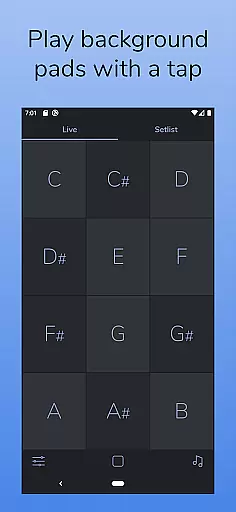
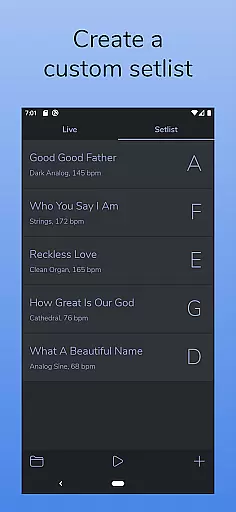
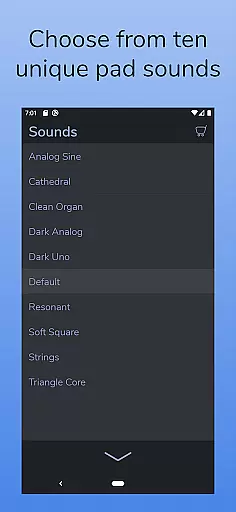
AutoPad is a versatile ambient pad loop application designed to enhance live performances and recordings with seamlessly looped drones. It offers two distinct modes - LIVE mode for instant access to all twelve musical keys, and SETLIST mode for creating custom song lists. The app comes equipped with 10 expertly crafted pad sounds, each providing a unique atmosphere across all keys. Additionally, users can expand their sound library through in-app purchases or by importing WAV files.
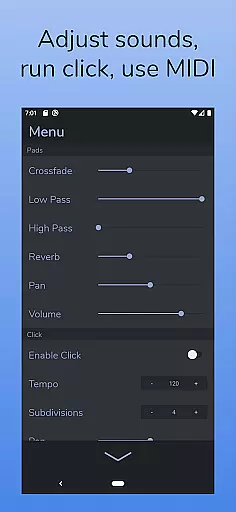
Beyond its core functionality, AutoPad includes practical features such as a built-in metronome for band synchronization, MIDI compatibility for external controller support, and adjustable parameters including crossfade time, filters, reverb, pan, and volume. Its dark color scheme ensures optimal visibility during performances. This makes AutoPad particularly valuable for musicians seeking subtle atmospheric enhancement without complex chord progressions.
AutoPad distinguishes itself through several innovative features that cater specifically to musicians' needs. The app's dual-mode functionality allows seamless switching between instant key access and customized setlists, while its collection of 10 professionally designed pad sounds provides diverse atmospheric options. The inclusion of a built-in metronome eliminates the need for additional equipment during performances.
Advanced customization options enable precise control over sound characteristics through adjustable crossfade times, dual filters, reverb settings, panning, and volume levels. Furthermore, AutoPad supports MIDI integration (excluding virtual and Bluetooth MIDI on Android), allowing musicians to trigger pads using external controllers. The app's exclusive focus on root, fifth, and octave notes creates flexible major/minor contexts, making it particularly suitable for worship music where continuous background pads are often preferred over frequent chord changes.
AutoPad offers a rich and diverse music library that caters to various musical needs. With 10 carefully designed pad sounds included, each provides a unique atmosphere in all 12 keys, ensuring that users have ample options for their soundscapes.
The app also supports expansion of the sound library through in-app purchases or by importing personal pad files, although currently limited to wav format on Android. This flexibility allows musicians to personalize their experience while respecting copyright laws.
Ensuring copyright authenticity is crucial for professional use. AutoPad's commercial licensing gives peace of mind to users who wish to incorporate these ambient pads into live performances and recordings without legal concerns.
By providing both built-in and expandable options, AutoPad meets the demands of creative professionals seeking high-quality, royalty-free sounds for continuous playback in their mixes.
Audio quality is paramount when performing or recording music, and AutoPad excels in delivering pristine sound. The app features two filters, reverb amount control, pan, and volume adjustments, allowing precise tailoring of the audio output to match any environment.
For seamless integration with live bands, AutoPad includes a built-in metronome that keeps everyone in sync without the need for additional equipment. This feature ensures that timing remains tight during performances.
Furthermore, AutoPad responds to MIDI controllers, enabling users to trigger pads with an external keyboard for an even more dynamic performance. Note that virtual MIDI or Bluetooth MIDI support is not available on the Android version at this time.
Musicians can rely on AutoPadu2019s sophisticated audio settings to produce polished, studio-grade soundscapes every time they play, making it an indispensable tool for both stage and studio work.
User-friendly interface
Seamless looping technology
Versatile sound library
Customizable parameters
Reliable performance
Limited file format support
No virtual MIDI on Android
Basic sound editing tools
Occasional latency issues
Premium sound pack costs

Fun & Easy Voice Changer – Record, Edit & Add Hilarious Effects!
 4.50
4.50
Powerful beat maker & DJ mixer to remix tracks, make music, & perform DJ mix
3.70
Enhance the sound quality of your devices, listen to what you want
4.50
Save hundreds of dollars for a physical strobe tuner and instead use this app.
4.50
Simple & Intuitive Metronome
4.70
Visualize the guitar fretboard, master scales & play through changes like a pro!
4.50
Record, Mix & Master with all n-Track effects, 64-bit audio and Stem Separation.
4.70
Smart piano keyboard, Classical to Pop, Real-time multiplayer connection!
4.20
Offline Tunes, Unlimited Vibes
3.90
Make songs with AI! Any genre, custom lyric, song generator for music creation!
4.80
Full-featured, High-Quality Groovebox Workstation, perfect for Live Performance!
4.80
Ultimate Sonos Controller
4.70
The best music and audio player, with beautiful UI, music search and equalizer.
4.60
A complete sound package for the sound engineer or enthusiast
4.60
Reverse your voice & songs instantly! Fun singing challenge with cool effects.
4.60
Your HD audio recorder on the go for music, meetings, ambience, animal sounds…
4.30
Network/Cloud Streaming, Visualization, Graphic Equalizer and Sound Effects.
4.20
Offline and always ad-free - stream in the highest quality available.
4.10
Turn your Android phone into a professional audio analyser with up to 120 bands.
4.00


User Reviews