
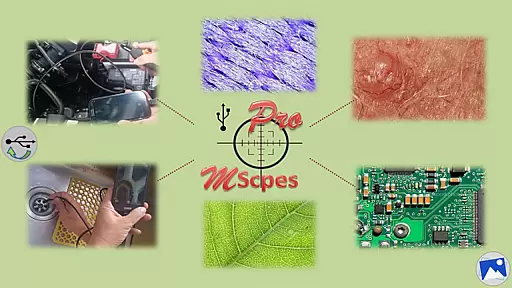
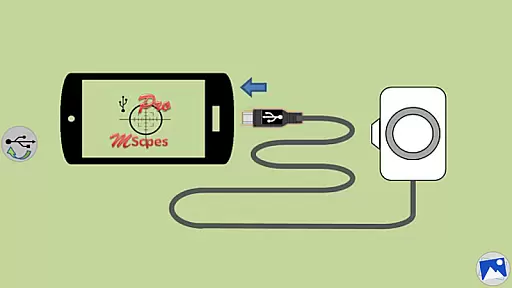
MScopesPro for USB Camera is a versatile application designed to enhance the functionality of USB video class cameras when connected to Android smartphones or tablets. This app allows users to view, capture images, and record videos from digital microscopes, endoscopes, borescopes, camcorders, or webcams via USB connection. For devices with type-A connectors, an OTG adapter is necessary to bridge the connection.
With its Pro version, MScopesPro offers advanced features such as full-screen mode, zoom and pan capabilities, multiple image type support, customizable preview options, adjustable color parameters, and more. These features make it an ideal tool for professionals who require portability and flexibility in their microscopic or internal inspections.
The app's ability to work without rooting the device adds to its accessibility, making it suitable for a wide range of users. Whether you're examining microscopic objects or hard-to-reach areas, MScopesPro provides a mobile solution that increases convenience and efficiency.
MScopesPro stands out with its comprehensive set of features tailored for USB camera usage. The Pro version includes full-screen mode for uninterrupted previews, allowing users to utilize 100% of the screen real estate. With intuitive touch controls, users can zoom and pan using one or two fingers directly on the preview window.
Additional functionalities include support for JPEG and PNG image formats, optional date and time stamps on previews and captured images, customizable notes, and cross-hair overlays. Users can also enjoy watermark-free captures, pinch-to-zoom on previews, and selections for camera resolution and preview sizes ranging from 640x480 to 1600x1200 pixels.
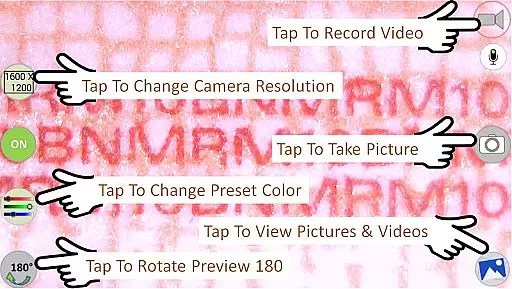
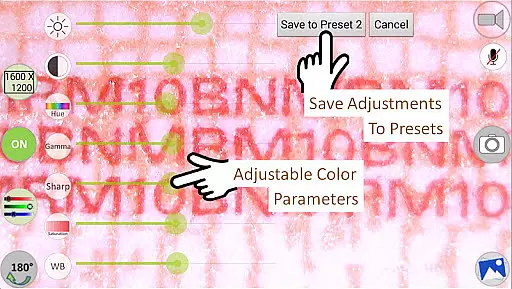
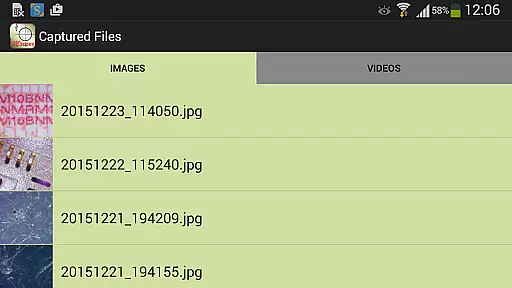
Color parameter adjustments are available for brightness, contrast, hue, gamma, sharpness, saturation, and white balance, with the option to save settings to three presets. Video recording options allow microphone control, while media management features provide buttons for sharing, editing, and deleting images and videos. The swipe interface enables easy viewing and selection of media files.
Video format compatibility is a crucial feature for any video player or editor application. MScopesPro supports multiple preview sizes such as 640x480, 800x600, 1280x720, and 1600x1200, ensuring that users can work with a wide range of video resolutions.
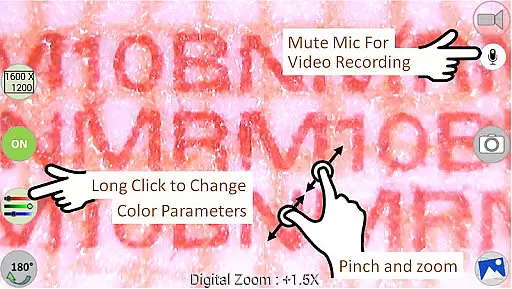
The app also provides adjustable color parameters including brightness, contrast, hue, gamma, sharpness, saturation, and white balance. This flexibility allows users to fine-tune the video appearance according to their preferences or specific project requirements.
Additionally, MScopesPro enables users to save their adjusted color parameters to three presets. This feature streamlines the workflow by allowing quick access to preferred settings without the need for repeated adjustments.
By supporting both jpeg and png image types, the app ensures broad compatibility with different file formats, making it versatile for various use cases in microscopy, endoscopy, and other fields requiring detailed visual documentation.
AI-powered editing features are transforming the way users interact with video content. MScopesPro offers advanced functionalities like full-screen mode, which removes on-screen buttons to provide a 100% preview area, enhancing focus on the content being captured.
With options to add date and time stamps, cross-hairs, and up to three lines of notes directly onto the preview and captured images, users can maintain detailed records and annotations without needing additional software. These features are particularly beneficial for professional applications where documentation accuracy is paramount.
The Pro version includes pinch and zoom capabilities on the preview, allowing precise control over the framing and composition. Users can easily manipulate the view using one or two fingers, providing an intuitive and responsive editing experience.
Furthermore, MScopesPro includes essential tools such as buttons to share, edit, and delete images and videos, along with the option to turn the microphone on or off during video recording. These comprehensive editing features ensure that users have all necessary tools at their fingertips, enhancing productivity and creative freedom.
User-friendly interface
Advanced customization options
High compatibility with various USB cameras
Comprehensive feature set in Pro version
No need for device rooting
Limited support for certain Android versions
Requires OTG adapter for some devices
Premium version comes at a cost
Dependent on device UVC support
May not work on all Android phones

Powerful, professional, versatile teleprompter. Developed by an active film crew
 4.00
4.00
Save photos and videos from social apps in one tap.
3.60
Watch a large amount of high-definition short drama content
4.60
Live TV, anywhere in your home
3.80
Support 1000+ Video Format, Subtitle Download, mp3 & Background Play, Cast On TV
4.60
Stream Web Videos to Chromecast, Samsung, LG, Sony, Roku, Fire TV, DLNA + more
4.00
AirMirror Receiver - Screen mirroring/cast web videos to Android TV by AirPlay.
4.40
Fast & easy HD video downloader for all formats, support 4K playback & download.
4.60
Movie maker & video editing app with AI effects and green screen
4.30
Screen recorder with audio to take live videos & Screenshot in high quality!
4.70
Search & download videos from net with all video downloader, auto-detect & safe.
4.60
Download website videos fast&privacy
4.40
Video player, file manager for all formats, 4K/HD media player supports subtitle
4.30
Powerful Video Editor & Photo Editing App —— Quick Edits & Stunning Effects!
4.30
Powerful video player with advanced hardware acceleration and subtitle supports
4.20
Your media, on your terms.
4.10
Browser for Samsung TV to stream webvideos, online movies and livestreams in HD
4.10
1)AirPlay/DLNA Mirroring/Streaming, up to 4 connections; 2)Samba/NAS/DMS Player.
4.00
The smartest M3U IPTV Player your playlists have ever seen.
4.1


User Reviews