





XPlay Browser is a cutting-edge mobile application designed to provide users with a fast, private, and video-focused browsing experience. Engineered for efficiency, this browser offers quick page loading, even on older devices, while maintaining a clean and modern user interface. Its lightweight design ensures smooth navigation without compromising device performance.
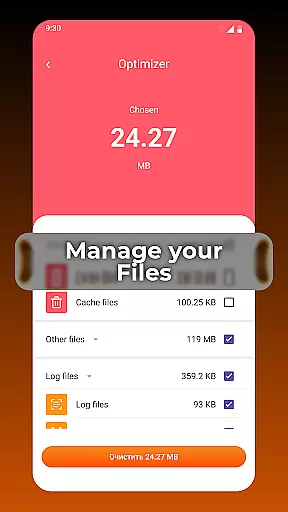
One of the standout features of XPlay Browser is its Private Browsing Mode, which ensures that no history is stored during your sessions, offering enhanced privacy protection. Additionally, the app allows users to download videos from supported websites directly, enabling offline viewing without the need for additional applications. With smart file management tools, it also helps keep your device organized by identifying and managing unnecessary files.
This browser is ideal for users who prioritize speed, privacy, and seamless multimedia experiences. Whether you're streaming videos or managing files, XPlay Browser delivers a comprehensive solution that enhances everyday mobile internet usage.
XPlay Browser stands out due to its combination of speed, privacy, and multimedia capabilities. The app's architecture is optimized for fast and smooth browsing, ensuring pages load quickly regardless of the device's age or specifications. This makes it an excellent choice for users who need reliable performance without high resource consumption.
Privacy is another cornerstone of XPlay Browser's functionality. Its Private Browsing Mode is meticulously designed to protect user data by not storing any browsing history and limiting permissions to only what's essential. This feature provides peace of mind for those who require confidentiality in their online activities.
In addition to privacy, XPlay Browser excels in video handling. Users can easily download videos from supported websites directly within the app, streamlining the process of saving and watching content offline. Coupled with smart file management features, the app ensures that your device remains clutter-free and efficient, enhancing both storage capacity and overall performance.
Video format compatibility is a crucial feature for any video player, ensuring that users can enjoy content in various formats without interruptions or the need for additional software. XPlay Browser excels in this area by supporting an extensive range of video formats, making it versatile and user-friendly.
The browser's ability to handle different video types means you won't be limited by specific codecs or file extensions. Whether you're streaming online content or accessing locally stored videos, XPlay Browser provides seamless playback. This flexibility enhances the overall user experience, allowing individuals to focus on their viewing rather than technical limitations.
Moreover, XPlay Browser's support for multiple formats extends to its video downloading feature. Users can save videos from supported websites and watch them offline later, regardless of the original format. This ensures that your downloaded content remains accessible and plays smoothly within the app.
In summary, XPlay Browser's broad video format compatibility empowers users with a hassle-free media experience. By removing barriers related to file type restrictions, it delivers convenience and reliability, which are essential for both casual viewers and those who require specific formats for professional use.
AI-powered editing features represent a significant advancement in video players and editors, offering smart tools that enhance productivity and creativity. XPlay Browser incorporates these innovations to provide users with intuitive functionalities that simplify complex tasks.
One standout feature is the automatic video optimization powered by AI algorithms. When you play a video, the browser intelligently adjusts settings such as brightness, contrast, and color balance to ensure optimal visual quality. This not only improves the viewing experience but also saves time since manual adjustments are unnecessary.
Additionally, XPlay Browser leverages AI for efficient file management. The app can analyze your stored media files and suggest cleanup actions, like deleting duplicates or unused videos. These smart recommendations help maintain an organized library, freeing up valuable storage space while keeping your collection clutter-free.
By integrating AI-driven capabilities, XPlay Browser sets itself apart as a forward-thinking tool for modern users. Its intelligent features streamline workflows and elevate the standard video playback experience, catering to both everyday needs and more demanding multimedia projects.
Fast page loading
Private browsing
Video downloads
Smart file tools
Lightweight design
Limited video sites
No sync features
Few extensions
Basic UI
Offline only

A full editing room to accompany your Insta360 cameras and handheld gimbals.
 3.30
3.30
Video Player - Unlimited features, 30 days money back guarantee.
4.60
Watch a large amount of high-definition short drama content
4.60
Tik & Story Saver-Download ALL social media videos, photos & reels no watermark.
4.80
Create photo video with music & template. AI video maker for stunning slideshow.
4.60
All format media Player, no need video converter any more!
4.00
GENRAL PRO - General Pro is the best video player that fully supports all formats.
4.70
Browser for Sony TV to stream web videos, online movies and live tv
3.20
Browser + Remote for Roku to stream webvideos, online movies and livestreams
4.60
An easy-to-use and all-round screen recorder with audio
4.80
Snaptubè Video Downloader app allows to download videos and music in Snaptube. .
4.60
Search & download videos from net with all video downloader, auto-detect & safe.
4.60
Cast movies, tv shows and live streams to Chromecast, Roku, DLNA, Fire TV & more
4.60
Photo and Music Video Creator into Stunning Videos—Effortlessly
4.40
Fast video downloader & private browser. Save HD clips to watch offline.
4.40
Create & edit videos with AI
4.30
AI Video Editor:AI Music, Text to Video,Text to Speech,Auto Caption,Video Effect
4.00
The essential companion to your Blue Iris PC software
2.50
Video player with powerful streaming playback and various convenient features.
2.10


User Reviews