


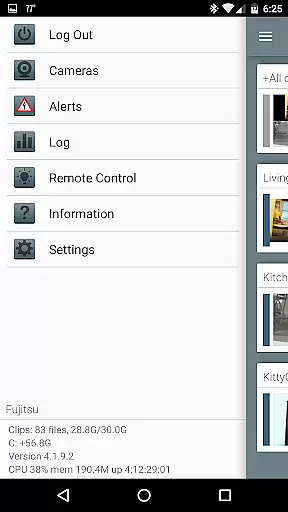


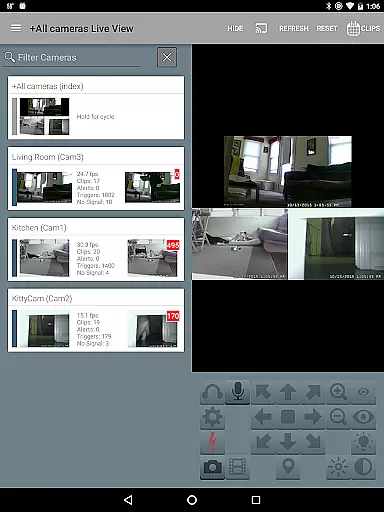
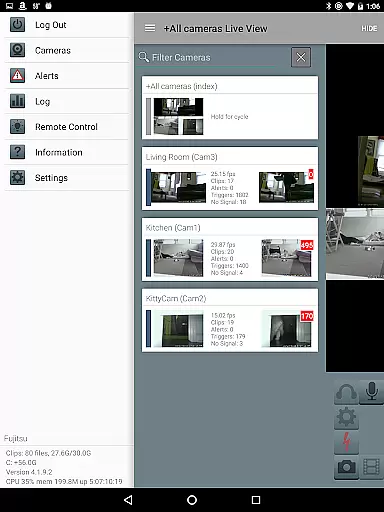
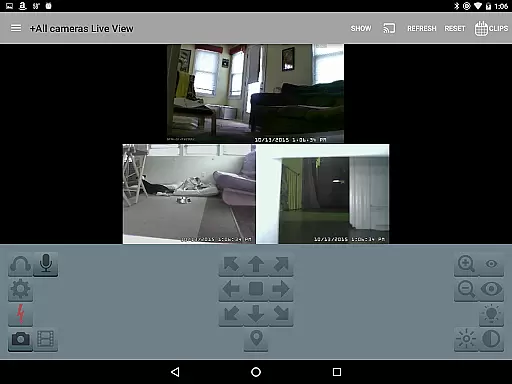
Blue Iris is a specialized client application designed to work in tandem with the Blue Iris Windows PC software, enabling users to remotely manage their home camera network. This app provides a secure and centralized connection point to your surveillance system without requiring individual cameras to be exposed to the internet. By maintaining session-based protocols, it ensures that no plain text passwords are transmitted, offering peace of mind for privacy-conscious users.
With Blue Iris, you can control multiple installations of the software, manage traffic signals, schedules, and profiles, and receive instant Android push alerts when motion is detected or critical status updates occur. The app supports fast H.264 streaming, PTZ (pan-tilt-zoom) controls, audio communication, and more. Additionally, users can review recordings at up to 64x speed and selectively delete files directly from the Blue Iris PC storage. Its comprehensive feature set makes it an essential tool for advanced home security management.
Blue Iris offers a robust suite of features tailored for managing sophisticated home security systems. One standout capability is its support for multiple Blue Iris installations, allowing users to switch between different setups seamlessly. The app also lets you control key functionalities such as traffic signal icons, scheduling options, and profile selections directly from your mobile device.
Another notable feature is the ability to receive real-time Android push notifications whenever a connected camera detects motion or issues a critical status alert. For video performance, the app leverages fast H.264 streaming technology, ensuring smooth playback even on slower networks. Users can also interact with their cameras by controlling PTZ functions, IR settings, and other supported features. Furthermore, two-way audio functionality allows users to listen and talk through compatible cameras. With intuitive navigation via tapping and swiping, reviewing stored footage becomes effortless, while remote DIO output controls add another layer of versatility.
Video format compatibility is a crucial aspect of any video player, ensuring that users can access their content without technical hindrances. Blue Iris excels in this area by supporting a wide range of video formats, particularly through its optimized H.264 streaming capability.
The app's integration with the Blue Iris Windows PC software allows for seamless playback of high-quality video streams from multiple camera installations. This ensures that whether you're reviewing recorded footage or monitoring live feeds, the video playback remains smooth and reliable.
Users benefit from the ability to review recordings stored on the Blue Iris PC at speeds up to 64x, made possible by the app's efficient handling of various video formats. The consistent performance across different types of media files enhances the overall user experience.
This comprehensive format support not only simplifies the user's interaction with their security system but also maximizes the value of their existing camera infrastructure. By eliminating format-related limitations, Blue Iris provides a versatile solution for both casual monitoring and professional security operations.
While primarily a video management solution, Blue Iris incorporates several AI-powered features that enhance its functionality beyond basic video playback. The app's intelligent alert system demonstrates this capability by using advanced algorithms to detect and notify users of important events captured by their cameras.
The Android push alert system represents a sophisticated implementation of artificial intelligence, capable of distinguishing between routine footage and critical status messages. This feature helps reduce false alarms while ensuring that genuine security concerns are promptly communicated to users.
Additional smart features include automated traffic signal icon control and intelligent profile selection based on predefined schedules or detected patterns. These capabilities demonstrate how AI integration streamlines daily operations and enhances security management efficiency.
By incorporating these AI-driven functionalities, Blue Iris transforms from a simple video viewer into a comprehensive smart security solution. The combination of traditional video management with modern artificial intelligence creates a powerful tool for both home and professional security applications.
User-friendly interface
Secure session protocol
Fast H.264 streaming
Real-time alerts
Multi-installation support
Requires Windows PC
No standalone use
Complex setup
Limited OS support
Dependent on main software

?100% FREE! Download & save videos? safely in this app. All formats supported.
 4.60
4.60
KineMaster, Your Ultimate Video Editor!
4.40
Powerful HD video player with support for all formats & subtitles.
4.3
This app was created to edit the metadata of music files.
4.20
Live TV, anywhere in your home
3.80
Support 1000+ Video Format, Subtitle Download, mp3 & Background Play, Cast On TV
4.60
Seamlessly connect and control your smart devices, anytime, anywhere with ease.
4.60
IPTV Loader, loads your own Playlist. DOES NOT CONTAIN ANY LIST OR CHANNELS
4.60
Screen recorder with audio to take live videos & Screenshot in high quality!
4.70
Find, download, and play torrents with the official BitTorrent® Pro app
4.70
High-Quality USB Camera Viewer & HDMI Display
4.70
Snaptubè Video Downloader app allows to download videos and music in Snaptube. .
4.60
Cast to Chromecast, Xbox, Fire Stick, Roku, DLNA, Smart TV & No Feature Limited!
4.50
Video Downloader is an utility that can save videos and music from web sites
4.20
LumaFusion: The Ultimate Storytelling Experience for Video Editing
4.10
Fast private browser with secure, seamless access & supported video downloads!
4.00
Connect 2 UVC devices for recording and broadcast video/audio stream
3.90
HD video & music player - All format support with floating & PIP mode!
3.80
All in one multi protocols stream receiver for AirPlay, Cast and DLNA.
3.60


User Reviews