
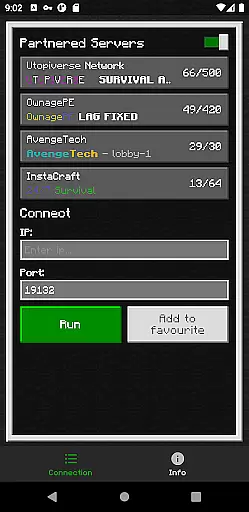
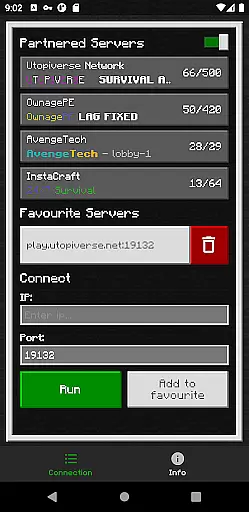
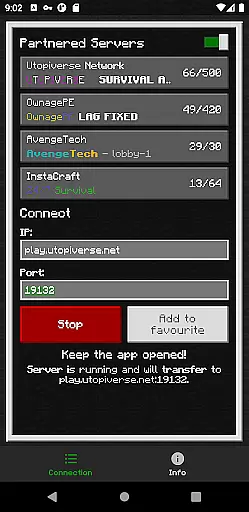
BedrockTogether (Pro) is an advanced networking tool designed to simplify server connections for Minecraft Bedrock Edition players. This ad-free version allows any Bedrock Edition server to appear as a LAN server on Xbox or PlayStation clients, enabling seamless connections without DNS rerouting. While Realms and Nintendo Switch compatibility are not supported, the app provides reliable performance for other platforms.
The application's core functionality lies in its ability to establish direct server connections through a simple interface. Users can input their desired server IP and port, then activate the connection with a single click. This streamlined process makes it particularly useful for Minecraft players who frequently connect to different servers within their local network.
What sets BedrockTogether (Pro) apart is its user-friendly approach to server connectivity. By eliminating complex network configurations, it creates a more accessible gaming experience for both casual and dedicated players. The tool proves especially valuable during multiplayer sessions, where quick server switching can significantly enhance gameplay efficiency.
BedrockTogether (Pro) distinguishes itself through several key features that enhance the Minecraft server connection experience. The application's primary feature is its ability to transform any Bedrock Edition server into a LAN-visible entity for Xbox and PlayStation users. This functionality operates through a sophisticated local network protocol implementation that doesn't require complex DNS modifications.
Additional notable features include a straightforward user interface with minimal setup requirements. Users simply input their server details and activate the connection through a single button press. The application also incorporates automatic network detection capabilities, ensuring optimal performance across various home network configurations. Furthermore, the pro version removes all advertisements, providing an uninterrupted user experience.
While the application doesn't support Realms or Nintendo Switch connections, it compensates with robust troubleshooting resources. These include detailed connection instructions and active community support through Discord and Telegram channels. The developer has also implemented comprehensive error handling to help users identify and resolve common connection issues efficiently.
BedrockTogether (Pro) delivers precise and effective core functionality by enabling any Bedrock Edition server to appear as a LAN server on Xbox or PlayStation clients. This seamless connection eliminates the need for complex DNS rerouting, making it simple for users to access their desired servers without hassle.
The app allows users to enter their server IP and port, click the 'Run' button, and connect through the 'Friends' tab in Minecraft Bedrock Edition. By following these straightforward steps, users can effortlessly join servers using the LAN tab, enhancing their gaming experience while ensuring smooth and reliable connectivity.
With its ad-free version, BedrockTogether (Pro) ensures uninterrupted gameplay, providing a clean interface that focuses solely on delivering accurate and efficient server connections. This attention to detail guarantees that users can enjoy their gaming sessions without unnecessary distractions or interruptions.
BedrockTogether (Pro) boasts a simple and intuitive interface, designed to make server connections as effortless as possible. Users can easily input their desired server IP and port, then initiate the connection with a single click on the 'Run' button. This streamlined process removes any unnecessary complexity, allowing gamers to focus on what truly mattersu2014their gameplay experience.
The app's design emphasizes clarity and ease of use, ensuring that even those new to Minecraft Bedrock Edition can navigate its features with confidence. By eliminating cumbersome procedures like DNS rerouting, it offers an accessible solution for all players looking to connect to LAN servers quickly and efficiently.
Furthermore, BedrockTogether (Pro) provides clear troubleshooting guidelines, helping users resolve common issues such as network connectivity problems. These instructions ensure that users can address potential obstacles swiftly, maintaining an enjoyable and frustration-free gaming environment.
Ad-free experience
Simple UI design
Reliable connection
Active support
Quick setup
No Switch support
Limited platform
Network dependent
No Realms access
Paid version

 4.50
4.50
FV File Manager Pro, Fast and powerful file manager for Android
4.60
This app unlocks the Pro features of the Central for DayZ app
3.60
Forza Tuning Calculator App for Forza Horizon 5, Motorsport and Earlier Titles
4.40
Unleash gamepad precision for ultimate mobile gaming dominance.
3.90
Undelete and recover your lost or deleted files with DiskDigger!
3.40
Clean up your phone, find files, play media, and share files offline
4.50
Enhance your Beats
3.70
The ideal app to be the digital eye of your family
3.40
Powerful collection of electronics tools and reference.A must for any enthusiast
4.90
Best leveling tool for your Android device. Hang paintings like a pro.
4.90
Unit and currency converter with easy and simple UI.
4.80
Optimize your WiFi network, turn your phone into Wifi Analyzer
4.70
Quickly switch to an encrypted DNS server on Android TV
4.50
Button mapper, mouse toggle, sleep timer and a lot of another features
4.50
Just swipe the edge to do something!
4.40
Pro Emulator is an easy to use game console emulator for a range of consoles.
4.40
App that Recover your pictures, videos or files after you delete them.
4.20
Fun lie-detection pranks for friends and parties.
3.80


User Reviews