


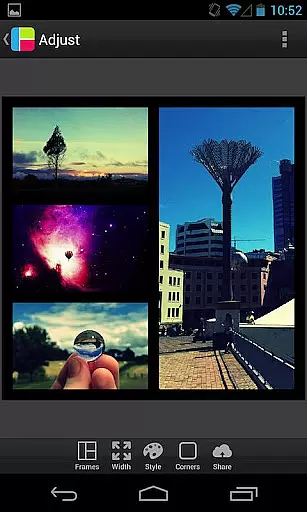
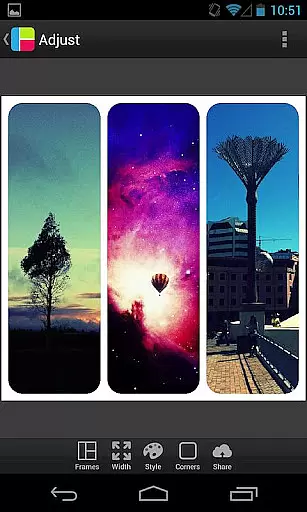

PicFrame is a versatile photography app that allows users to create stunning photo collages by combining multiple images into customizable frames. With 36 adjustable frame layouts, users can include up to five photos in a single frame, offering endless creative possibilities. The app provides advanced editing tools such as rounded corners, shape customization, and precise control over borders, colors, and patterns. Whether you're looking to enhance your social media posts or create personalized gifts, PicFrame ensures your collages stand out with its unique design options.
One of the standout features of PicFrame is its user-friendly interface, which makes it easy for anyone to produce professional-quality designs. Users can adjust brightness, contrast, and saturation for each photo individually, ensuring optimal image quality. Additionally, the app supports various aspect ratios, pinch-to-zoom functionality, and drag-to-move controls, making it simple to achieve the perfect composition. By saving creations directly to the gallery or sharing them instantly on platforms like Instagram, Facebook, and Twitter, PicFrame empowers users to express their creativity effortlessly.
PicFrame offers an impressive array of features designed to enhance photo editing and collage creation. One of its key strengths is the ability to fully customize frames, allowing users to drag inner borders for endless adjustments. This flexibility extends to rounded corners, adjustable border widths, and a variety of shapes including circles, hearts, and hexagons. The app also includes a robust color picker tool, enabling users to select precise border colors that match their aesthetic preferences.
In addition to frame customization, PicFrame provides 52 background patterns to choose from, adding depth and texture to each collage. Users can fine-tune individual photo settings such as brightness, contrast, and saturation, ensuring each image looks its best. The app supports multiple aspect ratios, pinch-to-zoom functionality, and rotation options, giving users complete control over their compositions. With high-resolution output options and seamless integration with social media platforms, PicFrame stands out as a comprehensive solution for creating and sharing visually striking collages.
Real-time capture and preview functionality is essential for photography apps as it allows users to see exactly what the final image will look like before taking a photo. PicFrame offers this feature by enabling users to adjust various settings such as brightness, contrast, and saturation in real time.
The app provides an interactive interface where users can pinch to zoom and drag to move photos within their frames. This ensures that each composition is perfectly aligned and visually appealing even before saving or sharing the framed collage.
With multiple output resolutions available, PicFrame caters to different needs whether you're posting on social media or printing your creations. The ability to select from six different aspect ratios including square format further enhances flexibility in creating unique designs tailored to specific platforms or personal preferences.
AI beauty and enhancement features are becoming increasingly popular in photography applications due to their ability to improve images while maintaining natural aesthetics. Although PicFrame does not explicitly mention AI-driven enhancements, its robust set of manual editing tools effectively achieves similar results through precise control over photo effects.
Users have access to adjustable border widths, rounded corners, and customizable shapes which contribute to enhancing the overall appearance of collages without compromising authenticity. Additionally, the inclusion of 52 background patterns adds depth and texture, enriching the visual experience.
An easy-to-use color picker allows for seamless customization of frame borders, ensuring that every creation has a personalized touch. These thoughtful design elements collectively ensure that PicFrame delivers high-quality enhancements that feel both intentional and organic, empowering users to produce stunning compositions effortlessly.
User-friendly interface
Extensive customization options
High-quality photo editing tools
Versatile frame designs
Seamless social media integration
Limited to five photos per frame
No advanced layering options
Some features may require in-app purchases
Occasional performance lags
Learning curve for beginners

Perfect photos with body shaping, BG changer and object remover.
 3.70
3.70
Safe & smart flight with Go Fly drone controller for 40+ drone camera, zone map
4.50
1M influencer's special filter
4.60
Edit like a pro with Hypic. Apply filters, AI effects, & magic touch.
4.40
See your baby AI baby face generator AI baby maker Face generator babymaker fun!
4.70
Easily view, share, delete photos with Gallery.
4.70
A light meter for true photographers.
4.20
A unique animation app. Powerful, easy to use, and lots of fun.
4.30
Try an anime version, cartoon yourself, and generate AI hug or aging videos!
3.70
A collection of tools and reference tables for DPs, ACs, DITs and Operators.
4.70
Cartoon and artistic effects for your photos and videos
4.70
Enhance, upscale, and transform your images — on your device, without limits
4.70
Automatically backup your photos and videos to computer, NAS and Cloud services
4.60
PhotoSync Bundle Add-On License. Enables all features and services in PhotoSync.
4.60
Trendy TikTok time warp scan funny filter app brings you unique photos & videos.
4.40
What celebrity do you look like? Celebs will find your celebrity match!
4.10
All-in-One Editor & AI Photo Enhancer, Collage, Cartoonify, Funny Stickers & BGS
4.10
GCamera allows all GCam features on all phone models! Better photos with GCamera
3.30
Remote control the phone camera shutter from your smartwatch and take a picture
1.60


User Reviews