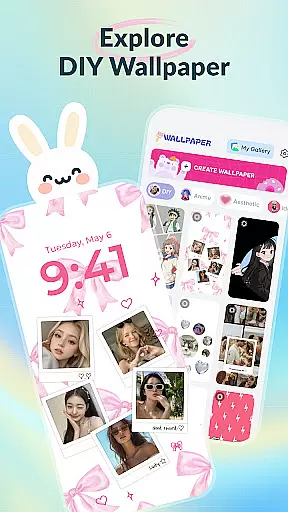
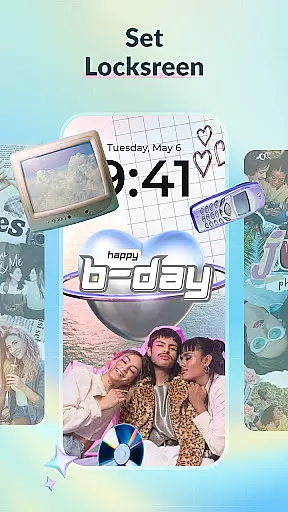
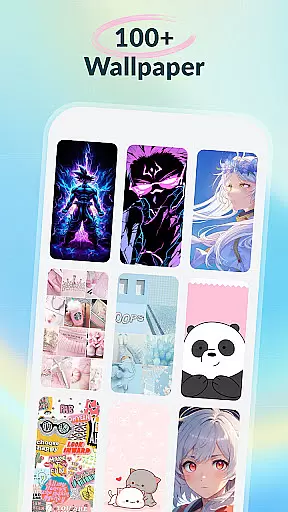
DIY Wallpaper & Collage Craft is a creative app designed for personalizing phone wallpapers. It offers three main features: DIY Frame Wallpaper, Collage Wallpaper Craft, and a Curated Wallpaper Gallery.
The DIY Frame Wallpaper allows users to transform their photos into captivating wallpapers using stylish frames and templates. The Collage Wallpaper Craft provides complete creative freedom to design unique photo collages with tools like stickers, text, and artistic filters. Lastly, the Curated Wallpaper Gallery offers a diverse selection of trendy, ready-to-use wallpapers.
This app is perfect for those looking to express their individuality through personalized phone aesthetics.
DIY Wallpaper & Collage Craft stands out with its powerful customization tools. Its DIY Frame Wallpaper feature includes dynamic and static frames, easy photo import, custom backgrounds, and fun stickers.
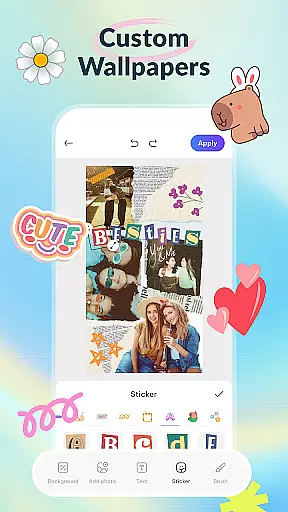
The Collage Wallpaper Craft section unleashes full creative potential with freeform creation. Users can import unlimited photos, add trendy stickers, insert custom text, utilize a creative brush tool, and apply artistic filters for professional results.
Additionally, the Curated Wallpaper Gallery is regularly updated with fresh, diverse themes ranging from aesthetic vibes to anime magic, ensuring there's something for everyone.
Customization is at the heart of DIY Wallpaper & Collage Craft, offering users a vast array of options to personalize their device's appearance. With features like DIY Frame Wallpaper, users can choose from dynamic and static frames, custom backgrounds, and an extensive sticker library to create unique designs.
The app provides complete creative freedom through its Collage Wallpaper Craft section, allowing users to import unlimited photos, arrange them as desired, and enhance their creations with trendy stickers, custom text, and artistic filters. This level of customization ensures that every wallpaper is a true reflection of the user's personal style and creativity.
For those seeking ready-to-use options, the Curated Wallpaper Gallery offers diverse themes ranging from aesthetic vibes to anime magic, ensuring there's something for everyone. The constant updates with the latest trends guarantee that users always have fresh and trendy choices at their fingertips.
DIY Wallpaper & Collage Craft excels in theme compatibility, ensuring that all created or selected wallpapers fit perfectly on any device screen. Whether it's crafting a collage or choosing from the curated gallery, users can be confident that their selections will display seamlessly across different devices.
The app supports various design elements such as live frames, static frames, and custom backgrounds, which are optimized for compatibility. Users can experiment with colors, patterns, and textures without worrying about resolution or aspect ratio issues, making every creation visually appealing and technically sound.
Moreover, the app's commitment to staying updated with the latest mobile culture trends means that new themes and design elements are regularly added. This dedication ensures ongoing compatibility with current devices and trends, providing users with endless possibilities to keep their screens fresh and stylish.
User-friendly interface
Vast customization options
Frequent content updates
Free to use
Creative freedom
May overwhelm new users
Design quality varies
Limited advanced tools
Ads present in the app
Some features require premium

Interactive Miniature Painting Catalogue
 3.30
3.30
More than 3000+ themes and 9000+ wallpapers for everybody!
4.10
Turn text & photos into stunning AI videos, art, and creative visual stories.
4.50
Adaptive Dot Style IconPack with Light & Dark Theme.
3.70
Launcher OS™ Pro without ads help make your phone simple and pretty
4.30
One 8 icons glass color version
4.80
A minimalist productivity launcher. One-hand-friendly. Zero ads.
4.70
Transform your phone with stunning video wallpapers and a unique, personal touch
3.80
Install amazing sticker packs: endless styles, always cool.
4.70
Gun Chase - Let the chase begin.
4.80
Dark icon pack based on One 8
4.80
Ultra realistic high quality analog watch face for Wear OS.
4.60
Make your phone look simple & luxury, like iDevice
4.60
Stylish Pink Cute Hippo keyboard with 10000+ customized keyboard themes!
4.60
Handcrafted pixel art icons, widgets & wallpapers
4.60
300+ widgets inspired by Material You and Material 3 expressive design.
4.60
3D, live, and moving wallpapers & themes in 4K and HD for your device.
4.50
Unleash Your Creativity and Connect with Loved Ones with Lockscreen Drawing!
4.20
Your go to Weather App & Home Screen. Get your weather at a swipe of a finger!
3.80


User Reviews