

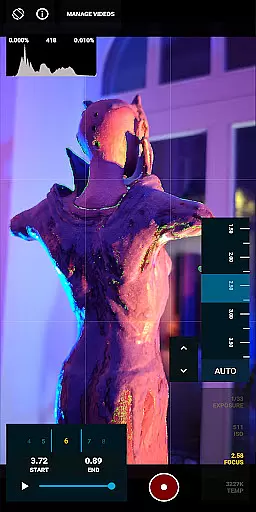







MotionCam Pro is a revolutionary photography and videography app that brings professional-grade tools to smartphone users. The app's standout feature is its ability to capture RAW video, a first for smartphone cameras. This allows photographers and videographers to retain maximum detail and flexibility in post-production.
In addition to its groundbreaking video capabilities, MotionCam Pro also enhances still photography through advanced computational algorithms. These algorithms replace standard smartphone camera software, enabling users to create stunning photos with improved dynamic range, color accuracy, and low-light performance.
Whether you're a professional photographer looking to expand your toolkit or an enthusiast seeking to elevate your mobile photography game, MotionCam Pro offers the tools needed to achieve exceptional results directly from your smartphone.
MotionCam Pro stands out with its unique combination of professional features tailored for both videographers and photographers. The app's most notable innovation is its RAW video capture capability, which preserves all image data from the sensor. This feature empowers creators with unprecedented control during video editing and color grading.
The app's computational photography engine represents another significant advancement. By processing multiple frames simultaneously, it produces images with enhanced detail, reduced noise, and improved exposure balance. The custom algorithms particularly excel in challenging lighting conditions, delivering results that rival traditional camera equipment.
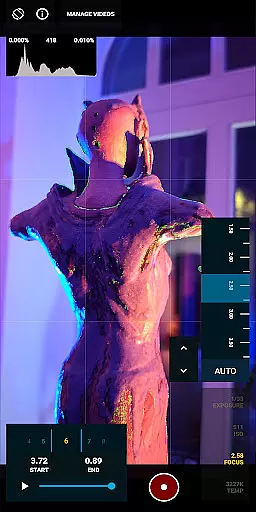
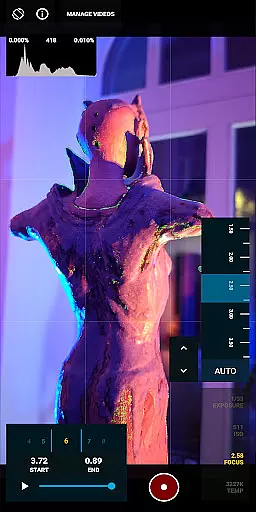
Additional features include manual controls for ISO, shutter speed, and white balance, giving professionals complete creative control. The app also supports various aspect ratios and resolutions, making it suitable for different types of projects, from social media content to professional-grade productions.
Real-time capture and preview functionality is essential for photographers who need to see the exact image they are capturing before taking the shot. MotionCam Pro excels in this area by providing users with a live view of their subject, ensuring that every detail is captured as intended.
The app utilizes advanced computational photography algorithms to enhance the live preview, offering features such as exposure adjustment, white balance settings, and focus peaking. This ensures that photographers can fine-tune their settings on the fly, resulting in perfectly exposed and sharply focused images every time.
With MotionCam Pro, users benefit from an intuitive interface that makes real-time adjustments straightforward and accessible even to amateur photographers. The ability to preview changes instantly allows for quick iterations and creative freedom, ultimately leading to higher quality photographs.
MotionCam Pro incorporates AI-driven beauty and enhancement features that elevate smartphone photography to new heights. These tools are designed to naturally enhance facial features while preserving the authenticity of the subject's appearance.
The AI algorithms analyze each photo, identifying key facial landmarks and applying subtle enhancements that improve skin texture, brighten eyes, and refine facial contours. Unlike traditional filters that often result in an artificial look, MotionCam Pro's enhancements maintain the natural essence of the photograph.
Photographers using MotionCam Pro will appreciate the balance between enhancement and realism, allowing them to produce stunning portraits that still reflect genuine human characteristics. This feature is particularly beneficial for portrait photographers seeking professional-grade results directly from their smartphones.
Industry-first RAW video
Advanced computational algorithms
Professional manual controls
Excellent low-light performance
Versatile shooting options
Steep learning curve
High storage requirements
Limited device compatibility
Processing time noticeable
Premium price point

Remote control of the phone camera from your Wear OS smartwatch
 3.70
3.70
All-in-One Editor & AI Photo Enhancer, Beautify & Retouch, Collage, Cartoonify
4.20
Edit like a pro with Hypic. Apply filters, AI effects, & magic touch.
4.40
The #1 app for B&W film developing featuring an advanced darkroom timer.
4.10
Automatically backup your photos and videos to computer, NAS and Cloud services
4.60
Movie camera, supports pro recording settings for filming. Try it and be amazed!
4.50
Snap photos remotely using your Garmin watch as the camera trigger
4.4
The original Rarevision VHS look seen everywhere!
4.70
Your Family Calendar + Photos. Manage your Skylight Calendar and Skylight Frame.
4.40
AI Photo Editor with 100+ Filters, Effects! Remove BG, Retouch & Photo Enhancer.
4.80
Enhance, upscale, and transform your images — on your device, without limits
4.70
Enhance, retouch & create your story - Share the moment with Photoshop Express.
4.60
PhotoSync Bundle Add-On License. Enables all features and services in PhotoSync.
4.60
Add Watermark - Sign your pictures with a text or logo. Effective, quick, easy!
4.50
AI photo enhancer with Sora 2! Enhance, descratch, and colorize your old photos.
4.50
Professional photography on your mobile phone
4.20
Catch sunlight, sunrise sunset times and sun phases with the AR sun tracker.
4.10
Hair color changer, AI haircut app, fun hair editor and buzz cut filter for all!
3.80
Create amazing frames with up to five photos. Rounded corners, effects and more!
3.60


User Reviews