


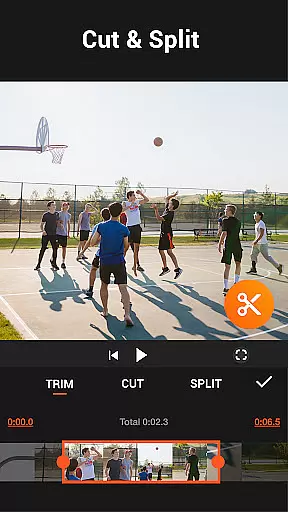
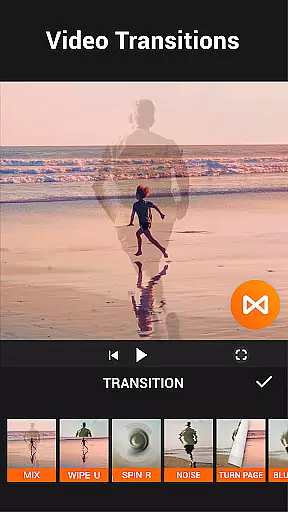





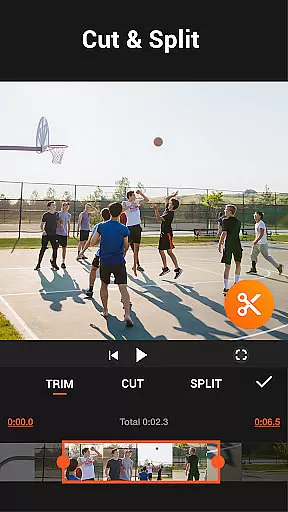
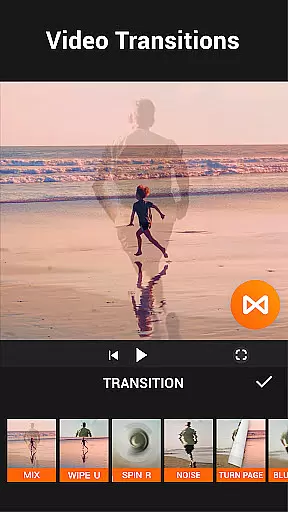


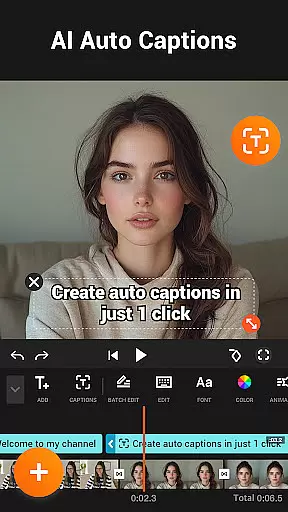
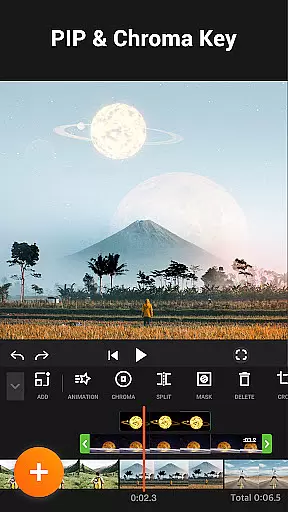

YouCut is a versatile video editing app designed for both casual users and content creators. It offers professional-grade tools including AI-powered features like auto captions and background removal, making video creation seamless. The app allows users to merge, cut, trim, and slice videos with precision while maintaining high-quality output.
With its intuitive interface, YouCut supports advanced functions such as chroma key effects, video speed control, and photo slideshow creation. Users can add music, apply filters, and adjust video parameters like brightness and contrast. Its standout feature is the ability to export videos without watermarks, ensuring polished, professional results for social media or YouTube uploads.
YouCut stands out with its robust set of features tailored for comprehensive video editing. One of its core strengths is the AI Video Boost, which includes auto captions, instant background removal, and video enhancement tools that elevate the quality of edits effortlessly.
The app provides creative flexibility through its multi-layer timeline, chroma key, and green screen functionalities. Users can merge multiple clips, compress files without losing resolution, and even create stop-motion videos. Advanced controls allow adjustments in video speed, aspect ratio, and color settings, enabling users to craft visually stunning content with ease.
Additionally, YouCut ensures an ad-free experience during editing, unlike many competitors. This streamlined workflow, combined with options like slow-motion effects and FX transitions, makes it ideal for producing engaging videos optimized for platforms like Instagram, TikTok, and YouTube.
Video format compatibility is a crucial feature for any video editing application, ensuring that users can work with a wide range of video types without conversion hassles. YouCut stands out in this aspect by supporting multiple formats and resolutions, even up to 4K quality. This flexibility allows creators to import videos from various sources, including smartphones, cameras, and online platforms, without worrying about format restrictions.
The app's ability to handle high-resolution files makes it suitable for both casual users and professional content creators. Whether you're editing short social media clips or longer cinematic projects, YouCut maintains the original quality while providing powerful editing tools. The inclusion of features like video speed control, color adjustment, and aspect ratio changes further enhances its versatility across different video formats.
Users benefit significantly from this broad compatibility as it saves time and storage space, eliminating the need for prior file conversions. Moreover, YouCut's compression feature helps reduce file sizes by up to 90% without noticeable quality loss, making sharing and storing videos more efficient. This combination of comprehensive format support and smart compression technology ensures that YouCut remains a top choice among mobile video editors.
AI-powered editing features are revolutionizing the way users approach video creation, and YouCut incorporates several advanced AI tools to enhance the editing process. One standout feature is the Auto Captions function, which uses speech-to-text technology to automatically generate subtitles for talking videos. This not only saves time but also improves accessibility for viewers who prefer or require text accompaniment.
Another impressive AI capability is the background removal tool, allowing users to instantly erase video backgrounds with precision. This feature opens up creative possibilities, especially for content creators focusing on product demonstrations or virtual presentations. Additionally, YouCut's AI enhancement options enable users to improve video and photo quality with just one tap, ensuring professional-looking results even from amateur footage.
The integration of smooth slow-motion effects powered by AI algorithms provides buttery-smooth transitions between frames, elevating the overall production value. These intelligent features work together to simplify complex editing tasks, making professional-quality video production accessible to everyone. By combining traditional editing tools with cutting-edge AI technology, YouCut offers a comprehensive solution that caters to both novice editors and experienced filmmakers looking to streamline their workflow.
User-friendly interface
AI-powered editing tools
No watermark on exports
Ad-free editing environment
High-quality video compression
Limited advanced features in free version
Occasional lag with large files
Fewer tutorials within the app
Basic audio editing capabilities
Some features require learning curve

Capture images & record videos for USB Camera, Webcam, Microscopes, Endoscopes
 3.80
3.80
High-Quality USB Camera Viewer & HDMI Display
4.70
Stream Web Videos to Chromecast, Samsung, LG, Sony, Roku, Fire TV, DLNA + more
4.00
Play and download HD videos from all sources — fast, simple, and all-in-one.
4.4
Add date and time watermark to photos and videos
4.50
All in one multi protocols stream receiver for AirPlay, Cast and DLNA.
3.60
Web Browser for LG TV to stream webvideos, online movies and livestreams in HD
4.20
A Simple app to download Video & Music from the Internet.
4.70
Download Hub, easy and private way to download and enjoy your videos offline
4.80
Snaptubè Video Downloader app allows to download videos and music in Snaptube. .
4.60
Seamlessly connect and control your smart devices, anytime, anywhere with ease.
4.60
IPTV Loader, loads your own Playlist. DOES NOT CONTAIN ANY LIST OR CHANNELS
4.60
Viddo: Generate Action Figure, AI Anime, AI kiss, AI hug Video from image & text
4.40
LumaFusion: The Ultimate Storytelling Experience for Video Editing
4.10
Livestream, news, & gaming content. Watch, chat, and upload. Join Rumble today!
3.80
This app is an emulator of some specific IPTV boxes
3.50
Download videos easily & play them all in one smart, powerful video manager.
3.40
Browser for Sony TV to stream web videos, online movies and live tv
3.20
The smartest M3U IPTV Player your playlists have ever seen.
4.0


User Reviews