
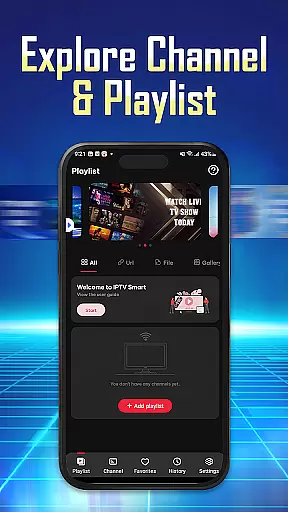
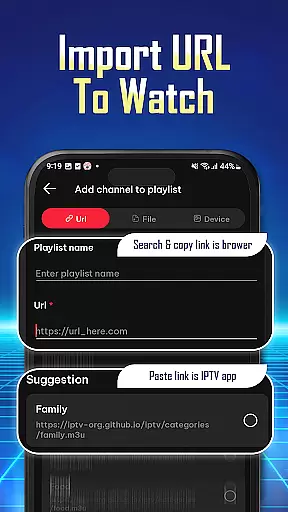
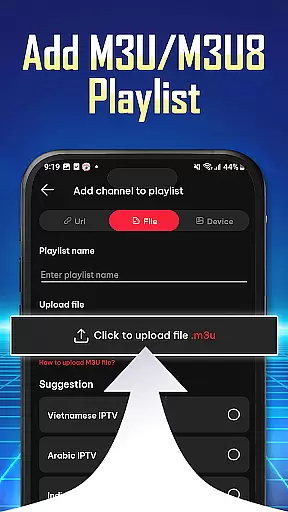
IPTV Player - Smarters Watch TV is a versatile media player designed for seamless streaming of live TV channels, sports events, and movie series. This application allows users to import playlists via URL or M3U/M3U8 files, making it easy to organize preferred content for quick access.
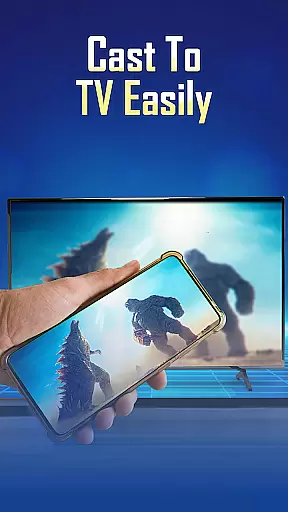
With support for high-definition streaming and multi-device compatibility, IPTV Player ensures an uninterrupted entertainment experience on phones, tablets, and Android TV. Its user-friendly interface and advanced features make it ideal for elevating your IPTV streaming journey.
IPTV Player offers a robust set of features tailored for streaming enthusiasts. Users can effortlessly add playlists using URLs or file imports, stream in high-definition quality, and enjoy content across multiple devices simultaneously.
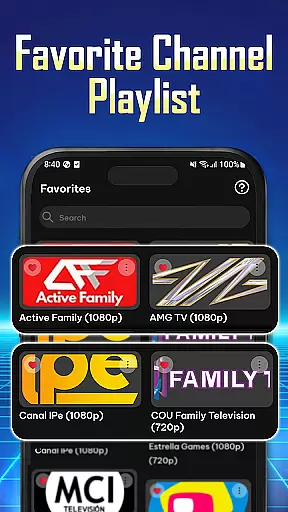
The app supports both M3U and M3U8 playlist formats, ensuring wide compatibility. Additionally, its personalized navigation allows users to save favorite channels and review playback history, enhancing the overall streaming experience with convenience and flexibility.
Video format compatibility is a crucial feature for any video player application, ensuring that users can access content in various formats without technical barriers. IPTV Player - Smarters Watch TV supports both M3U and M3U8 playlist formats, which are widely used for streaming live TV channels and on-demand content.
This app allows users to effortlessly import playlists using a Playlist URL or by adding M3U/M3U8 files directly. This flexibility ensures that regardless of the source format, users can easily manage and stream their preferred content. The ability to handle these formats makes it versatile for different types of media sources.
For users, this means they can enjoy an extensive range of content from live TV channels to sports events and movie series without worrying about format restrictions. The high-definition quality streaming further enhances the viewing experience, providing crisp and clear visuals across all compatible formats.
Ultimately, the wide video format compatibility of IPTV Player - Smarters Watch TV empowers users to personalize their entertainment options extensively. Whether watching on mobile devices or larger screens like Android TV, users benefit from seamless integration and uninterrupted streaming, making it a reliable choice for diverse multimedia needs.
AI-powered editing features represent the cutting-edge advancement in video players, enabling users to enhance their viewing experience through intelligent tools. While IPTV Player - Smarters Watch TV primarily focuses on streaming capabilities, its integrated functionalities offer some advanced features akin to AI enhancements.
The app provides a reliable integrated player that ensures seamless viewing without interruptions. Although not explicitly marketed as AI-driven, the efficiency and speed of switching between channels and managing playlists could leverage smart algorithms to optimize performance. These underlying technologies help maintain smooth navigation and quick access to favorite channels.
Users benefit significantly from these implicit AI-powered features as they facilitate effortless management of preferred channels, shows, and movies. Organizing content becomes intuitive, allowing users to save favorites and review history with ease. Such conveniences ensure that viewers spend more time enjoying their content rather than troubleshooting playback issues.
In summary, while IPTV Player may not boast explicit AI-powered editing features, its robust architecture hints at intelligent design elements that enhance user interaction. By focusing on seamless integration and efficient content delivery, the app delivers a superior viewing experience that aligns with modern expectations for smart, adaptive technology in video players.
User-friendly interface
HD streaming quality
Multi-device support
Flexible playlist options
Wide device compatibility
No pre-installed channels
Requires manual playlist setup
Limited offline functionality
Dependent on internet speed
Premium features may cost extra

Full HD Video mp3 Player, MP4 player play 1080p, File manager, Video Downloader
 4.40
4.40
Play ALL formats in 4K & HD. Video downloader, MP3 player, Chromecast & more.
4.80
Capture images & record videos for USB Camera, Webcam, Microscopes, Endoscopes
3.80
Stream Web Videos to Chromecast, Samsung, LG, Sony, Roku, Fire TV, DLNA + more
4.00
Turn your phone into a wireless camera!
4.20
Pro video editor app for Instagram, edit video with song, AI, effect & slowmo.
4.80
IPTV Loader, loads your own Playlist. DOES NOT CONTAIN ANY LIST OR CHANNELS
4.60
Browser + Remote for Roku to stream webvideos, online movies and livestreams
4.60
A Simple app to download Video & Music from the Internet.
4.70
Download Hub, easy and private way to download and enjoy your videos offline
4.80
High-Quality USB Camera Viewer & HDMI Display
4.70
Watch a large amount of high-definition short drama content
4.60
Create photo video with music & template. AI video maker for stunning slideshow.
4.60
Add date and time watermark to photos and videos
4.50
KineMaster, Your Ultimate Video Editor!
4.40
This app was created to edit the metadata of music files.
4.20
VLC for Android is the best open source video and music player, fast and easy!
4.10
Connect 2 UVC devices for recording and broadcast video/audio stream
3.90
Save photos and videos from social apps in one tap.
3.60


User Reviews