
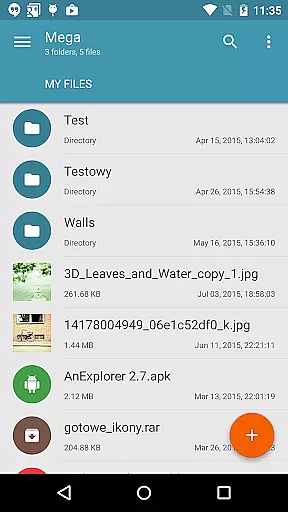
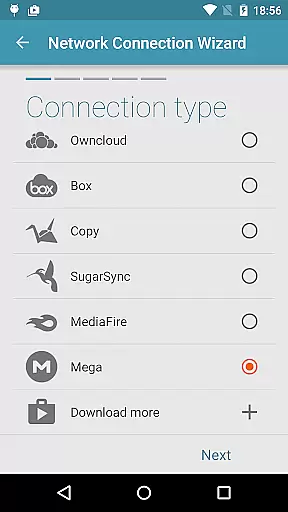
Mega Plugin for Solid Explorer is a productivity-focused extension that seamlessly integrates with your Solid Explorer file manager. This plugin enables users to directly connect their Mega cloud storage accounts, providing comprehensive file management capabilities without leaving the Solid Explorer interface. With support for essential operations like copying, moving, renaming, and viewing files, it ensures efficient handling of cloud-based data.
In addition to basic file management, the plugin allows for downloading and uploading files between local and cloud storage. Users can also stream music and videos directly from their Mega accounts, making it an ideal solution for those who rely on cloud storage for media consumption. Its intuitive connection process makes setup quick and easy, enhancing overall user experience.
The Mega Plugin offers a robust set of features designed to maximize productivity when managing cloud files. One standout capability is its comprehensive file operation support, which includes copying, moving, renaming, and viewing files directly within Solid Explorer. These functions are executed with minimal latency, ensuring smooth performance even with larger files or complex folder structures.
Beyond standard file management, the plugin facilitates bidirectional file transfers between local and cloud storage. Users can download files for offline access or upload new content effortlessly. Additionally, the integrated media streaming functionality supports both audio and video formats, allowing users to enjoy multimedia content without needing to download it first. This combination of features positions the plugin as a versatile tool for modern digital workflows.
Task management is a crucial aspect of productivity applications, enabling users to organize and prioritize their work efficiently. The Mega Plugin for Solid Explorer excels in this area by providing seamless integration with your Mega account.
This plugin allows you to perform a wide range of file management tasks directly within Solid Explorer. You can copy, move, rename, and view files with ease, streamlining your workflow and ensuring that your cloud storage is always organized.
By offering the ability to download and upload files, the plugin ensures that your important documents are always accessible, no matter where you are. This functionality enhances your productivity by allowing you to manage your files on-the-go.
The Mega Plugin's comprehensive task management features ensure that you can handle all your file operations without leaving the Solid Explorer interface, saving you time and effort.
Cross-device synchronization is essential for maintaining consistency across multiple devices, and the Mega Plugin for Solid Explorer delivers reliable performance in this regard. By connecting your Mega account, you ensure that your files are always up-to-date, regardless of the device you're using.
Once connected, the plugin enables automatic syncing of your files between your Mega cloud storage and Solid Explorer. This means that any changes you make on one device will be reflected across all others, providing a seamless experience.
The process of connecting to Mega is straightforward. By following a few simple steps, you can establish a secure connection that ensures your data remains synchronized. This reliability is crucial for users who depend on consistent access to their files.
With its robust cross-device synchronization capabilities, the Mega Plugin for Solid Explorer ensures that your files are always current and accessible, enhancing your overall productivity.
Seamless integration
Comprehensive file management
Efficient media streaming
User-friendly setup
Reliable performance
Limited to Mega users
Requires Solid Explorer
No standalone app
Premium account benefits
Occasional sync delays

The Pro Version of Android's tiniest Notepad app. Just 0.3MB but feature-packed!
 4.60
4.60
Absolutely the best CNC machinist speed and feed calculator around. fswizard.com
4.60
Remotely view listen control and record cameras.
3.70
App lock - lock apps with fingerprint, password, pin or pattern, protect privacy
4.70
Cloud storage, automatic phone backup, and more.
4.10
Enjoy classic gameplay with customizable features and retro-style graphics.
4.30
A beautiful digital clock with autostart and many other functions
4.70
A Pixel Art watchface inspired by other iconic 90s designs for Wear OS devices!
4.40
Understand anything with a personalized AI research assistant
4.80
Native client for Forgejo and Gitea
5.00
8 custom complications. Custom Time Fonts. Beautiful color schemes. A++ Design.
5.00
Best Tool for the professionals Electrician, Electrical contractors, etc.
4.90
aCalendar+ makes your day, week and month
4.70
Experience Reading - Night Mode for Documents
4.40
Share files & memories safely. Keep your photos and videos secure.
4.40
When you Focus, so will your Bean in this cozy focus timer
4.30
Code on-the-go with VScode for Android. Edit,debug and collaborate from mobile!!
3.10
Create study competitions, track your hours, and stay consistent with friends
4.1
A simple, portable logger for POTA, SOTA, Field Day, and more
4.4


User Reviews