

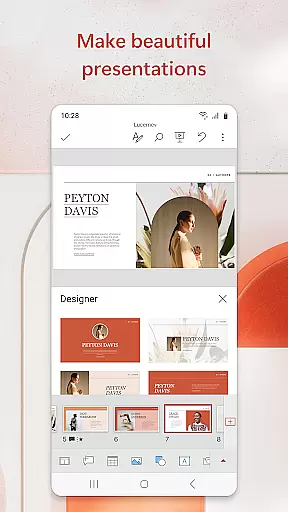

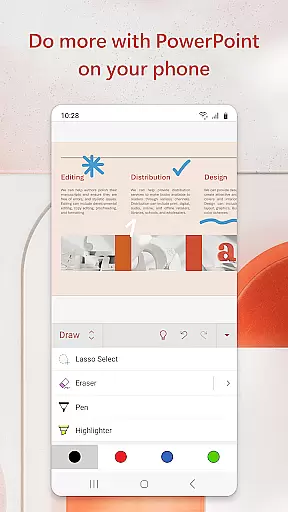

Microsoft PowerPoint is the quintessential presentation app that empowers users to create, edit, and present slideshows with ease on mobile devices. With its robust set of features, it allows for seamless integration of multimedia elements such as music, graphics, and charts into your presentations. Whether you're crafting quarterly reports or delivering yearly summaries, PowerPoint's templated slides ensure your work stands out.
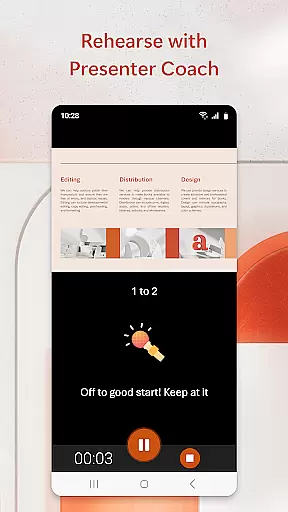
The app shines with its AI-driven Presenter Coach tool, which provides real-time feedback to refine public speaking skills. This feature helps users practice pacing, avoid filler words, and speak confidently. The synchronization across devices guarantees that your presentations are always up-to-date, eliminating concerns about file version discrepancies when switching between your phone, tablet, or PC.
PowerPoint also facilitates collaboration by allowing multiple users to edit PPT or PPTX files in real time. You can share your work with colleagues, view integrated comments, and track changes efficiently. With a qualifying Microsoft 365 subscription, users can unlock the full potential of this productivity powerhouse, making impactful presentations wherever they go.
Microsoft PowerPoint offers an extensive array of features designed to enhance productivity and creativity. One standout capability is the Presenter Coach, an AI assistant that provides constructive feedback during practice sessions. It includes a presentation timer to help speakers maintain an optimal pace and offers suggestions to eliminate verbal fillers like 'umms' for a polished delivery.
Customization is at the heart of PowerPoint's design, enabling users to craft unique presentations with highly customizable tools. From inserting photos directly within the app to recording videos on-the-go, these functionalities allow for dynamic content creation. Users can also leverage pre-designed templates to quickly assemble professional-looking slideshows without starting from scratch.
Collaboration is streamlined through integrated commenting systems and shared access permissions. Teams can work together in real time, reviewing each other’s contributions and providing instant feedback. Additionally, PowerPoint ensures data consistency across all devices via cloud syncing, so whether you're working on a smartphone or desktop, your latest presentation updates are always available.
Microsoft PowerPoint offers robust core task management features that streamline the process of creating, editing, and presenting slideshows. This functionality is crucial for users who need to manage multiple tasks within a single application efficiently.
The app allows users to create presentations from scratch or work on pre-existing slides, ensuring flexibility in task handling. With seamless synchronization across devices, users can access recently used files quickly, eliminating the worry of managing multiple versions of their work.
One significant advantage is the Presenter Coach tool, which helps users refine their delivery by providing real-time suggestions. This AI-driven feature assists in adjusting pacing, avoiding filler words, and speaking confidently, thereby enhancing the overall quality of presentations.
Ultimately, these task management capabilities ensure that users can focus on delivering impactful presentations without being bogged down by logistical challenges, making PowerPoint an indispensable tool for productivity.
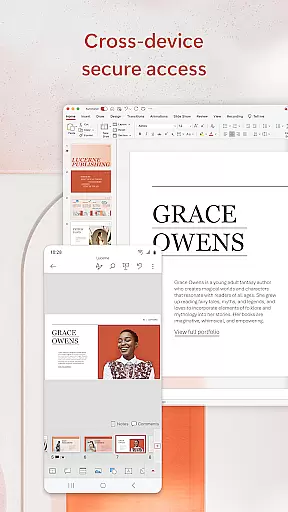
Cross-device synchronization is a pivotal feature of Microsoft PowerPoint, ensuring that users have reliable access to their presentations regardless of the device they are using. This reliability is essential for maintaining workflow continuity and efficiency.
PowerPoint presentations sync seamlessly across devices, allowing users to start a presentation on one device and continue working on another without missing a beat. This means that whether you're at your desk or on the go, your files are always up-to-date and accessible.
This synchronization extends to collaborative features as well. Users can share presentations with their teams, receive feedback, and view integrated comments, all while staying on top of changes and updates. Such features ensure that collaboration is smooth and efficient, no matter where team members are located.
By providing dependable cross-device synchronization, PowerPoint empowers users to work flexibly and efficiently, ensuring that their presentations are always current and readily available, thus significantly boosting productivity.
User-friendly interface
Real-time collaboration
AI-powered coaching
Seamless cross-device sync
Rich template library
Subscription fees apply
Limited free features
Requires internet
Occasional bugs
Learning curve

The long-awaited modern gallery app for your Nextcloud server
 4.70
4.70
Send files, sync SMS, notifications & clipboard across devices via local network
4.40
aCalendar+ makes your day, week and month
4.70
Stay on top of your to-dos with Google Tasks, part of Google Workspace.
4.60
ID.me Authenticator is a simple and free Two Factor Authentication solution
3.50
To do list widget with a notebook organizer, checklist, simple shopping list
4.60
Use powerful, industry-leading AI tools to generate visual charts from any data
4.80
Lightweight PDF, Word, Excel reader.
4.60
Seamlessly read, manage, and organize all your PDF files solution in one place
4.40
Native client for Forgejo and Gitea
5.00
Great calculator for Android named one of USA TODAY's "25 Essential Apps".
4.90
Mind Map and brainstorm, note taking and idea collection
4.80
Protect and view your important info on your phone and tablet with eWallet®
4.80
Direct Chat without saving contacts & Dual WA Account on Single Device
4.70
Tally and goal counter for Wear OS & mobile
4.50
Ultimate Virtual AI Character for immersive Roleplay Chat. Perfect Companion
3.90
Ads Free App! Editor, Hide File, Copy, Move, Delete and Rename.. all facility av
1.70
AI Video AI Image Private LLM AI Browser Llama Gemma Ollama Connect LLM Studio
4.1
The upgraded version of Name Wheel with AI and the power to add your own wheels.
4.2


User Reviews