
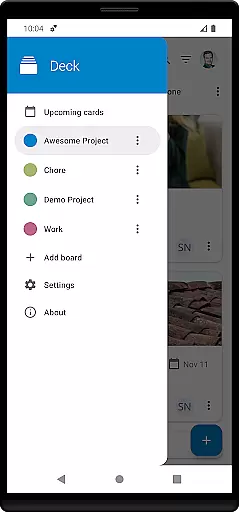
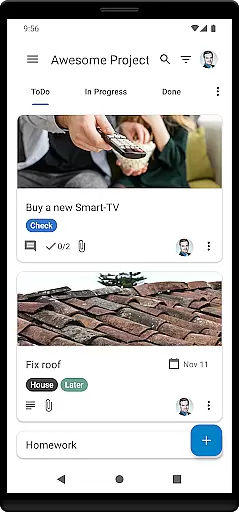
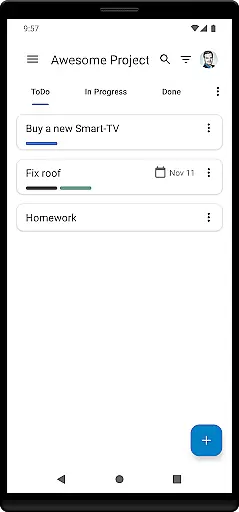
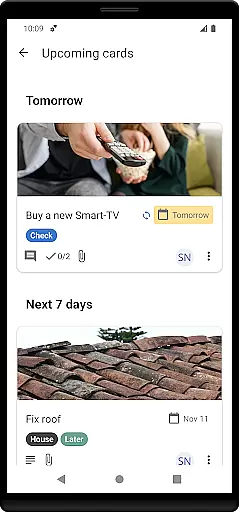
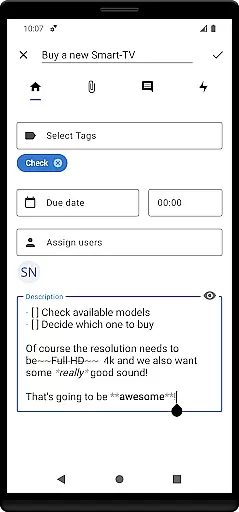
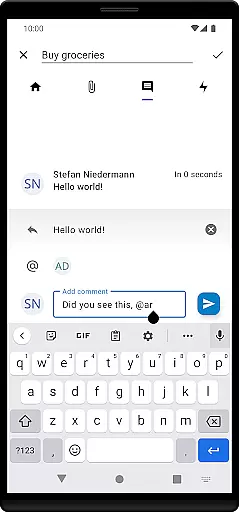
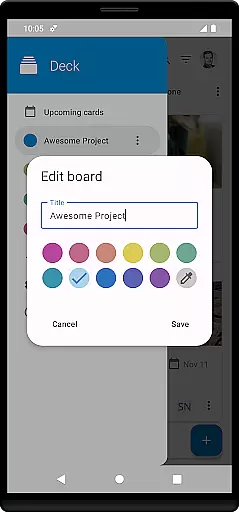

Nextcloud Deck is a productivity-focused application designed to streamline task management and team collaboration. This app allows users to create, organize, and manage cards, lists, and boards efficiently, making it ideal for both personal task tracking and team-based projects. With support for multiple accounts and offline functionality, users can access their data anytime, anywhere.
In addition to its core features, Nextcloud Deck supports attachments, activities, and comments, enhancing communication and documentation within projects. The app also offers a dark mode and is available in many languages, providing a customizable and accessible user experience. Whether you're managing a small team or handling individual tasks, Nextcloud Deck ensures that your workflow remains organized and efficient.
Nextcloud Deck stands out with its comprehensive set of features tailored for productivity. One of the key highlights is its ability to manage multiple accounts, allowing users to switch between different Nextcloud instances seamlessly. The app's offline capabilities ensure that users can continue working even without an internet connection, syncing data once connectivity is restored.
Another significant feature is the robust task management system, which includes cards, lists, and boards. Users can easily categorize tasks using tags, attach relevant files, and track progress through activities and comments. The inclusion of a dark mode not only reduces eye strain but also enhances usability in low-light environments. Furthermore, the app's translation into numerous languages makes it accessible to a global audience, ensuring that language barriers do not hinder productivity.
Nextcloud Deck offers a robust solution for managing tasks and projects efficiently. The app allows users to create, organize, and prioritize cards, lists, and boards, which are essential for task management. This functionality is crucial for individuals and teams who need to keep track of their work in a structured manner.
The app supports multiple accounts, enabling users to handle various projects across different Nextcloud instances without hassle. With the ability to manage tags, attachments, activities, and comments, Deck ensures that every detail of your tasks is captured and accessible. These features collectively enhance productivity by keeping all necessary information organized and within reach.
One significant advantage of using Nextcloud Deck is its offline capability. Users can continue managing their tasks even without an internet connection, with changes syncing automatically once online. This ensures uninterrupted productivity, making it ideal for users who are frequently on the move or working in areas with limited connectivity.
Cross-device synchronization is a vital feature of Nextcloud Deck, ensuring that all your data is consistently updated across multiple devices. Whether you're switching from your phone to your tablet or desktop, you can be confident that your tasks, comments, and attachments are always up-to-date. This seamless integration enhances the user experience by providing flexibility and convenience.
Deck's synchronization process is reliable and efficient, thanks to its integration with the Nextcloud ecosystem. By leveraging the Nextcloud Android app, users benefit from real-time updates and notifications, ensuring they never miss important changes or deadlines. This level of synchronization reliability is crucial for maintaining workflow continuity and collaboration.
Moreover, Nextcloud Deck supports dark mode and is available in many languages, catering to a diverse user base. These additional features contribute to a more personalized and comfortable user experience, further enhancing productivity. With its comprehensive set of tools and reliable synchronization, Nextcloud Deck stands out as a top choice for managing tasks across devices.
User-friendly interface
Offline functionality
Multi-account support
Comprehensive task management
Global accessibility
Requires Nextcloud setup
Limited standalone use
No built-in calendar
Dependent on third-party apps
Advanced features need technical knowledge

AI Video AI Image Private LLM AI Browser Llama Gemma Ollama Connect LLM Studio
 4.4
4.4
When you Focus, so will your Bean in this cozy focus timer
4.30
Mega cloud explorer plugin for Solid Explorer
3.80
Functional QR scanner and barcode reader that requires little storage space.
4.60
Tally and goal counter for Wear OS & mobile
4.50
A Pixel Art watchface inspired by other iconic 90s designs for Wear OS devices!
4.40
Scan paperwork into PDF/JPG, generate your own e-signature and send fax or email
4.70
Seamlessly read, manage, and organize all your PDF files solution in one place
4.40
Browse and view your photos and videos from the phone with photo & video hide.
4.10
Mind Map and brainstorm, note taking and idea collection
4.80
Protect and view your important info on your phone and tablet with eWallet®
4.80
App Lock with fingerprint, password: Lock apps & hide photos with lock screens
4.60
A simple Whisper AI keyboard for reliable speech transcription and rewording
4.60
Total remote control for your Android device, PC and cloud services (IFTTT)!
4.20
Activate Two Factor Authentication (2FA or Multi OTP), Password manager and more
4.10
Secure, open-source, SPICE and SSH Remote Desktop for QEMU KVM virtual machines
4.00
* block pre-roll ads, pop-up and forced redirect ads * Samsung certification app
4.00
The upgraded version of Name Wheel with AI and the power to add your own wheels.
4.0
A simple, portable logger for POTA, SOTA, Field Day, and more
4.0


User Reviews