




YouTube is the world's leading video-sharing platform, offering an extensive range of content across various categories. The official YouTube app for Android provides users with seamless access to this vast library, enabling them to watch, create, and engage with videos anytime, anywhere. With personalized recommendations on Home and curated content in Explore, users can easily discover new videos and channels that match their interests.
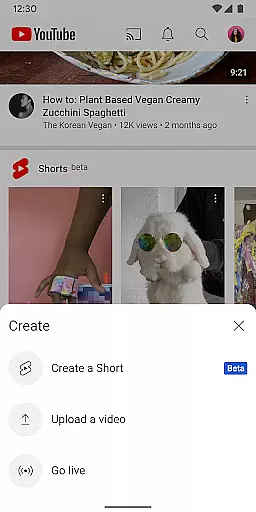
The app goes beyond simple video playback by allowing users to subscribe to their favorite channels, save videos for offline viewing, and even create their own content directly from mobile devices. Whether you're interested in music, gaming, beauty, news, or educational content, YouTube offers a diverse selection of videos tailored to every preference. Additionally, features like live streaming and community interaction make it a complete multimedia experience.
YouTube also supports family-friendly options through YouTube Kids and supervised experiences, ensuring safe and appropriate content for younger audiences. For power users, YouTube Premium removes ads, enables background play, and includes YouTube Music Premium benefits. This comprehensive feature set makes YouTube an essential tool for both content consumption and creation, connecting users to a global community of creators and viewers.
YouTube's feature set is designed to provide a complete video experience. The app's recommendation engine delivers personalized content suggestions on the Home tab, while the Subscriptions section keeps users updated on their favorite channels. The Library feature allows users to manage their watch history, liked videos, and saved playlists, creating a customized viewing experience that adapts to individual preferences.
Content creation tools enable users to record, edit, and upload videos directly from their mobile devices. The app supports live streaming, allowing creators to engage with their audience in real-time. Advanced features include channel memberships, where subscribers can support their favorite creators through paid memberships, gaining access to exclusive content and community perks. The platform also facilitates community building through comments, live chats, and interactive features like Stories and Premieres.
For users seeking enhanced experiences, YouTube Premium offers ad-free viewing, background play capability, and offline downloads. The service also includes YouTube Music Premium, providing unlimited access to music content. These premium features, combined with the app's core functionalities, establish YouTube as a versatile platform that caters to both casual viewers and dedicated content creators.
Video format compatibility is a crucial feature for any video player, ensuring that users can enjoy content in various formats without technical hindrances. YouTube excels in this area by supporting a wide array of video formats, from common ones like MP4 and AVI to more specialized codecs.
The app's robust compatibility allows creators to upload videos without worrying about format restrictions, while viewers can stream content seamlessly across different devices. This flexibility enhances the overall user experience, making YouTube a versatile platform for diverse video content.
Moreover, YouTube's adaptive streaming technology ensures that videos maintain high quality regardless of the original format. By automatically adjusting resolution based on internet speed, the platform guarantees smooth playback for all users.
This comprehensive format support not only benefits individual users but also makes YouTube an ideal platform for businesses and educational institutions seeking to share multimedia content with their audiences.
YouTube incorporates advanced AI-powered editing features that revolutionize how users create and enhance their video content. These intelligent tools help both amateur and professional creators produce high-quality videos with minimal effort.
The platform offers automatic caption generation using speech recognition technology, enabling creators to make their content more accessible. Additionally, YouTube's AI algorithms can suggest optimal video thumbnails and generate content summaries, helping creators optimize their videos for better engagement.
For viewers, the AI-driven recommendation system personalizes content discovery, suggesting videos that align with individual preferences and viewing history. This smart curation enhances user satisfaction and keeps viewers engaged with relevant content.
Furthermore, YouTube's machine learning capabilities continuously improve these features, ensuring that both creators and viewers benefit from increasingly sophisticated tools that enhance the overall video experience.
User-friendly interface
Extensive content library
Offline viewing option
Live streaming capability
Community engagement tools
High data consumption
Limited free features
Ads in free version
Regional restrictions
Background play limitations

Video Player - Unlimited features, 30 days money back guarantee.
 4.60
4.60
Video Trimmer, Video to MP3 Converter. Extract music from video, Easy & Fast.
4.80
HD video maker with no watermark, no ads & vlog maker with music, PIP, text
4.50
KMPlayer Plus (Divx Codec) officially support Divx codec.
4.30
An easy-to-use and all-round screen recorder with audio
4.80
Connect EasyCap or UVC devices for recording and broadcast video/audio stream
3.60
Browser for Samsung TV to stream webvideos, online movies and livestreams in HD
4.10
Browser + Remote for Roku to stream webvideos, online movies and livestreams
4.60
Screen recorder with audio to take live videos & Screenshot in high quality!
4.70
Play ALL formats in 4K & HD. Video downloader, MP3 player, Chromecast & more.
4.80
High-Quality USB Camera Viewer & HDMI Display
4.70
Download videos and play them offline
4.70
Fast & easy HD video downloader for all formats, support 4K playback & download.
4.60
Auto video maker with music & exclusive filters. Video editing made simple.
4.50
Fast, private downloading, video saving, social media
4.50
KineMaster, Your Ultimate Video Editor!
4.40
Powerful video player with advanced hardware acceleration and subtitle supports
4.20
Capture images & record videos for USB Camera, Webcam, Microscopes, Endoscopes
3.80
Mix with Virtual DJ directly from your phone or tablet !
3.10


User Reviews