
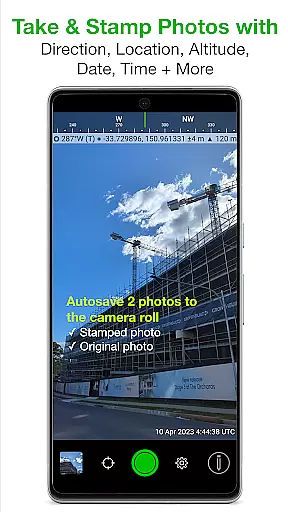
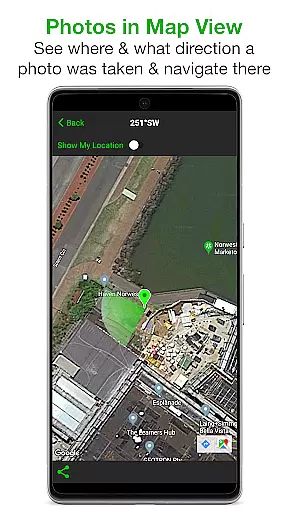
Solocator is a professional GPS camera app designed for fieldwork and photo documentation across various industries. It allows users to overlay critical metadata such as location, direction, altitude, date, and time directly onto photos. With the optional Industry Pack, users can capture additional details like project names, descriptions, and street addresses, making it ideal for professionals who need comprehensive photo records.
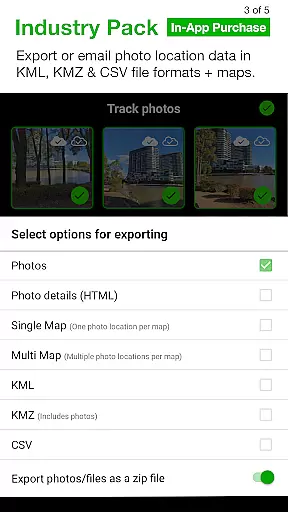
The app supports both front and back cameras, includes advanced features like UTM/MGRS coordinates, tilt and roll angles, and autosaves photos with or without overlays. Its extensive sharing capabilities allow exporting data in KML, KMZ, and CSV formats, while integration with cloud storage services ensures seamless workflows. Solocator is particularly valuable for government agencies, construction teams, and field researchers who require accurate geotagged photo documentation.
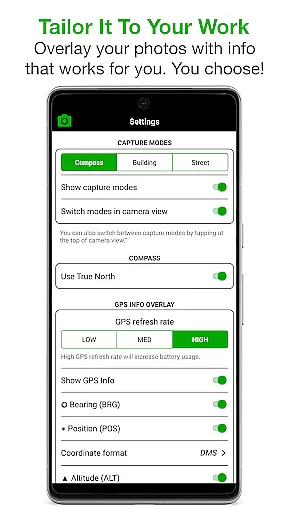
Solocator offers an impressive range of features tailored to enhance photo documentation. Users can customize overlay information, including GPS position, compass direction, altitude, and more. The app supports multiple coordinate formats (UTM/MGRS) and units (metric/imperial), ensuring compatibility with global standards. Advanced functionalities like tilt and roll angles, crosshair display, and UTC/local time options provide precision for technical use cases.
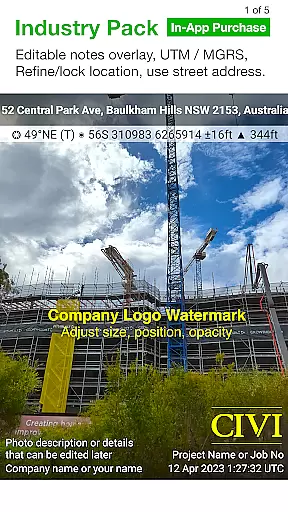
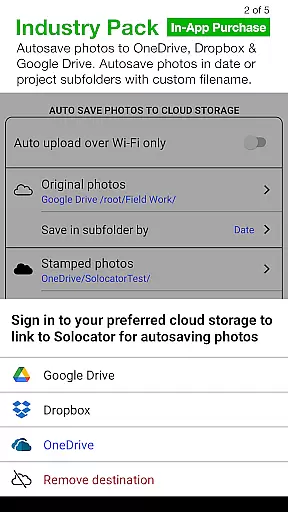
With the Industry Pack, users gain access to editable notes overlays, batch editing tools, and custom export filenames. Autosave functionality extends to cloud storage platforms like Google Drive and Dropbox, streamlining collaboration. Additionally, the app's ability to refine and lock GPS locations makes it indispensable for challenging environments where accuracy is paramount. These robust features make Solocator a versatile tool for professionals requiring detailed and reliable photo records.
Real-time capture and preview functionality is essential for photography applications like Solocator. This feature ensures that users can instantly see the results of their photos with all selected overlays applied before taking the shot.
Solocator provides a comprehensive overlay system that includes GPS position, compass direction, altitude, and more. These details are displayed in real-time on the camera screen, allowing users to tailor the information they need for each photo.
The app supports both back and front cameras, pinch zoom, self-timer, flash, and exposure controls. This versatility ensures that users can capture high-quality images while having all necessary data stamped on them without delay.
With real-time previews, users can ensure that every photo meets their requirements for documentation or proof purposes. This immediate feedback enhances the overall user experience by reducing the chances of missing critical details during fieldwork.
While Solocator does not focus on AI beauty enhancements typical in social media apps, it offers powerful features to enhance photo authenticity and utility. The app's ability to overlay crucial metadata such as location, direction, and time taken adds a layer of credibility and professionalism to each image.
The Industry Pack available through an in-app purchase extends these capabilities further by allowing users to add project names, descriptions, and watermarks. These additions help maintain context and provide attribution, which is vital for professional documentation.
Additionally, Solocator allows batch editing of notes overlay fields, custom export filenames, and autosaving to cloud storage services. These features streamline workflows and ensure that photos are organized and easily accessible for future reference.
By focusing on accuracy and detail rather than aesthetic enhancements, Solocator delivers natural and reliable photo documentation solutions tailored for various industries and professionals worldwide.
User-friendly interface
Comprehensive metadata options
Cloud storage integration
Customizable export formats
Global coordinate support
Industry Pack is paid
No compass on some devices
Limited free features
Occasional GPS inaccuracies
Complex for casual users

A collection of tools and reference tables for DPs, ACs, DITs and Operators.
 4.70
4.70
Long exposure camera with computational photography
2.60
Perfect photos with body shaping, BG changer and object remover.
3.70
Cut and paste photo editor & eraser to customize photos easy and swap faces fun
4.50
How old age camera Gender Swap App Face Shape Hairstyle App Hair Styler App fun!
4.00
Turn your phone into a professional camera - full DSLR manual photography
4.30
A reflected light meter with spot metering and incident light metering.
4.40
Professional camera app that brings DSLR manual photography controls to Android.
4.20
Your Family Calendar + Photos. Manage your Skylight Calendar and Skylight Frame.
4.40
Perfect body tune & face app - photo retouch, makeup, slim body & beautify face.
4.80
Easily view, share, delete photos with Gallery.
4.70
Unblur, enhance & restore photos with powerful AI photo enhancer tools.
4.60
Transform photos into videos! Create realistic or anime-style images easily!
4.50
HD Camera Pro with HD Video shooting, Panorama, Photo editor , Beauty Camera.
4.50
RAW video capture with advanced controls
4.40
Natural Beauty, Selfie Retouch
4.30
Professional quality photo edits with the new Snapseed.
4.00
Remote control of the phone camera from your Wear OS smartwatch
3.70
Application for remote controlling DSLR
3.00


User Reviews