
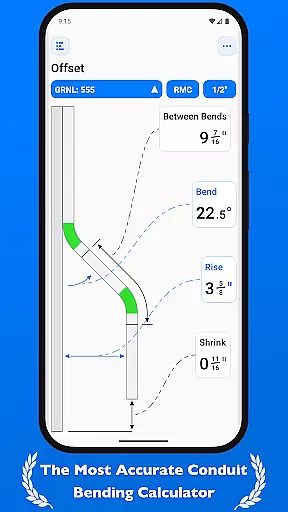
QuickBend is a cutting-edge conduit bending calculator app designed for electricians and professionals working with conduit systems. The app provides highly accurate measurements by incorporating the radius of the shoe and bender, conduit type, and size diameter into its calculations. Using the centerline radius algorithm, QuickBend ensures precision in every bend, making it an essential tool for both seasoned professionals and DIY enthusiasts.
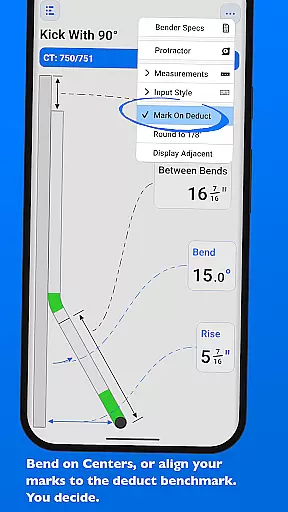
Beyond its core functionality, QuickBend offers an intuitive user interface that allows users to toggle between different input styles such as a number pad or slider bar. It supports multiple measurement units including inches and centimeters, while also offering advanced features like QuickCheck, which visually indicates the feasibility of bends through color-coded feedback. With support for various types of bends and the ability to layout multiple bends on a single conduit, this app streamlines workflows and minimizes errors.
QuickBend is particularly useful for those who need fast, reliable calculations in the field. Its comprehensive documentation and visual tools make it easy to understand complex conduit layouts, saving time and reducing material waste. Whether you're handling simple offsets or intricate compound bends, QuickBend delivers professional-grade results every time.
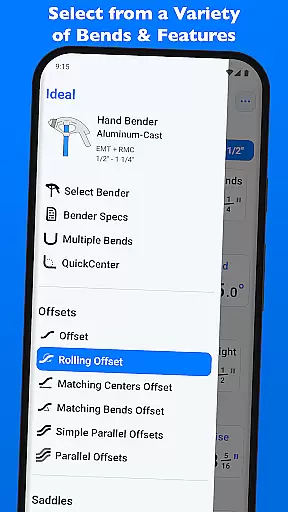
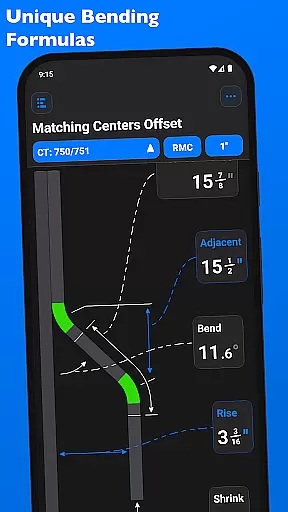
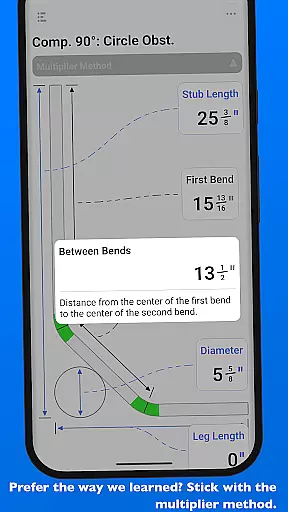
QuickBend stands out with its innovative features tailored specifically for conduit work. One of its key strengths is the advanced centerline radius algorithm, which generates precise measurements for all supported bend types. This includes offsets, rolling offsets, saddles, and more complex configurations like compound 90° bends around obstructions. Each calculation is rigorously field-tested to ensure accuracy and reliability in real-world applications.
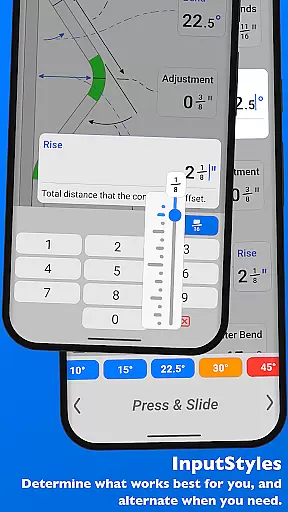
The app's flexibility extends to its customizable input methods. Users can choose between a traditional number pad or an interactive slider bar (Press & Slide), allowing them to input data in the way that feels most natural. Additionally, QuickBend supports seamless switching between imperial and metric units, catering to a global audience. The inclusion of QuickCheck adds another layer of convenience by providing instant feedback on bend feasibility through subtle text color changes.
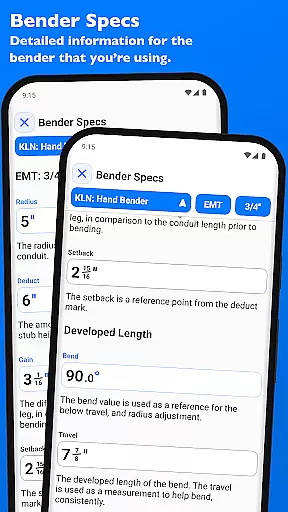
Another standout feature is the ability to manage and edit detailed specifications for different benders directly within the app. Users can pin frequently used benders for quick access and view critical details such as deduct, gain, setback, and travel adjustments for any degree up to 90°. These features not only enhance productivity but also empower users to fine-tune their workflow according to specific project requirements.
QuickBend revolutionizes task management for electricians and DIY enthusiasts by offering precise conduit bending calculations. The app incorporates advanced algorithms that factor in the radius of the shoe and bender, conduit type, and size diameter to ensure accurate measurements.
With its intuitive interface, users can swiftly input data using either a number pad or slider bar, catering to different preferences and working styles. This flexibility enhances productivity by allowing users to choose the most efficient method for their needs.
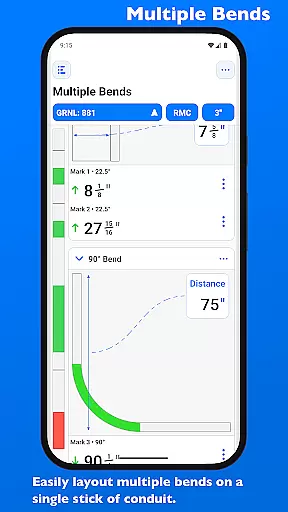
The app's ability to layout multiple bends on a single conduit streamlines complex tasks. Users can easily flip individual or sets of marks per bend, ensuring maximum precision and eliminating costly errors during installations.
By supporting various bend types and providing detailed documentation for each, QuickBend empowers users to complete projects faster while maintaining professional-grade accuracy.
While primarily designed as a standalone productivity tool, QuickBend offers reliable cross-device functionality through its consistent performance and standardized calculations. Electricians can trust that their bending calculations will be identical across different devices, ensuring project consistency.
The app's comprehensive bender specifications database is universally accessible, allowing users to view and edit detailed information about centerline radius, deduct, gain, and setback values. These specifications remain constant regardless of the device being used.
QuickBend's innovative pinning feature enables users to favorite frequently-used benders, making them readily available across sessions and devices. This ensures quick access to preferred tools without needing to scroll through extensive lists repeatedly.
Through its robust design and manufacturer-specified bender data, QuickBend maintains calculation integrity across various platforms, providing electricians with peace of mind when switching between work and personal devices.
Highly accurate calculations
User-friendly interface
Supports multiple units
Comprehensive bend options
Real-time feasibility checks
Premium version required
Steep learning curve
Limited free features
No offline mode
Device compatibility issues

QuickBooks Workforce lets teams view pay info and track time in one place.
 4.70
4.70
Easily read and manage all your PDF files
4.10
Remotely view listen control and record cameras.
3.70
IP Camera Viewer - Android TV : RTSP Surveillance camera viewer for Android TV
4.0
All in One PDF Reader: Manage, Read and Edit your Documents
4.20
Great calculator for Android named one of USA TODAY's "25 Essential Apps".
4.90
The ultimate file manager for rooted devices. The original and still the best.
4.00
Quickly and easily keep track of your work shifts
4.70
Use powerful, industry-leading AI tools to generate visual charts from any data
4.80
Android Wallet Password Manager
4.80
Understand anything with a personalized AI research assistant
4.80
The Pro Version of Android's tiniest Notepad app. Just 0.3MB but feature-packed!
4.60
Secure, fast, open-source, Remote Desktop Client for Windows and Linux with SSH
4.60
Stay on top of your to-dos with Google Tasks, part of Google Workspace.
4.60
Enjoy classic gameplay with customizable features and retro-style graphics.
4.30
Professional calendar app for Google Calendar, MS Outlook & Exchange
4.20
Access your phone's notifications, calls, apps, photos & texts on your PC
3.90
Make your handwriting beautiful, even more than pen on paper.
3.60
A comprehensive suite of tools designed specifically for Lactation Consultants
4.0


User Reviews